Best Practices for Database Connection Pooling: Pool Size, Timeouts, and Troubleshooting
Opening a new database connection for every request can waste time and server resources. Depending on the environment, establishing a connection may involve DNS lookups, a TCP connection, TLS negotiation, and authentication. Under high traffic, repeatedly performing these steps can increase latency and put unnecessary pressure on the database server.
Database connection pooling reduces this overhead by reusing established connections. However, an incorrectly configured connection pool can cause connection pool exhaustion, slow requests, and excessive resource utilization.
This guide explains the best practices for database connection pooling, how to determine an appropriate database connection pool size, and how to troubleshoot common connection problems without overwhelming your database.
What Is Database Connection Pooling?
Database connection pooling is a technique that maintains a reusable group of database connections instead of creating a new connection whenever an application needs to access a database.
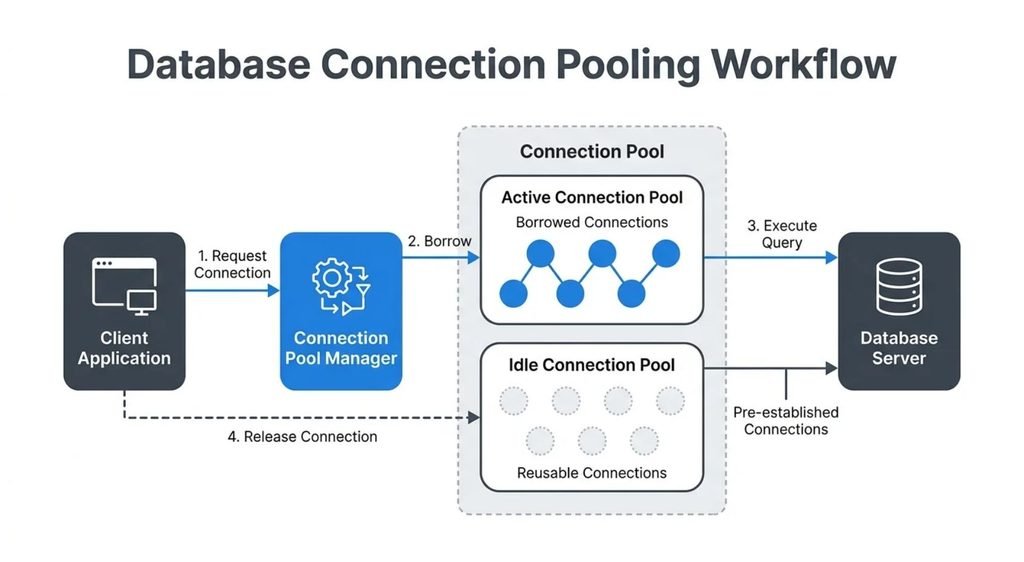
A connection pool manager controls how connections are created, reused, and retired. When a request needs a database connection, the application borrows an available connection from the pool. After completing its database operations, the application returns that connection so another request can use it.
For example, an application serving hundreds of requests does not necessarily need hundreds of newly created connections. It can reuse a smaller number of connections, provided the pool is sized appropriately and requests do not hold connections longer than necessary.
Many database drivers and frameworks provide built-in connection pooling. Microsoft’s ADO.NET SQL Server connection pooling documentation explains how connection reuse works in .NET applications.
How Does Database Connection Pooling Work?
A database connection pool typically follows a simple lifecycle:
- The application requests a connection from the pool.
- The pool manager provides an available connection or creates one if capacity allows.
- The application executes a SQL query or performs other database operations.
- The application releases the connection back to the pool.
- The pool makes that connection available for another request or retires it according to its configuration.
If every connection is busy, a new request may need to wait for a connection. If no connection becomes available before the configured connection acquisition timeout, the request can fail.
Why Is Database Connection Pooling Important?
Creating connections repeatedly introduces overhead. Pooling helps reduce that work, improves connection reuse, and can support more predictable application performance.
However, pooling does not automatically make every database workload faster. A pool that is too small can cause requests to wait, while a pool that is too large can overwhelm the database with excessive concurrency and resource consumption.
The goal is to maintain enough connections to handle normal demand without exceeding the database’s practical capacity.
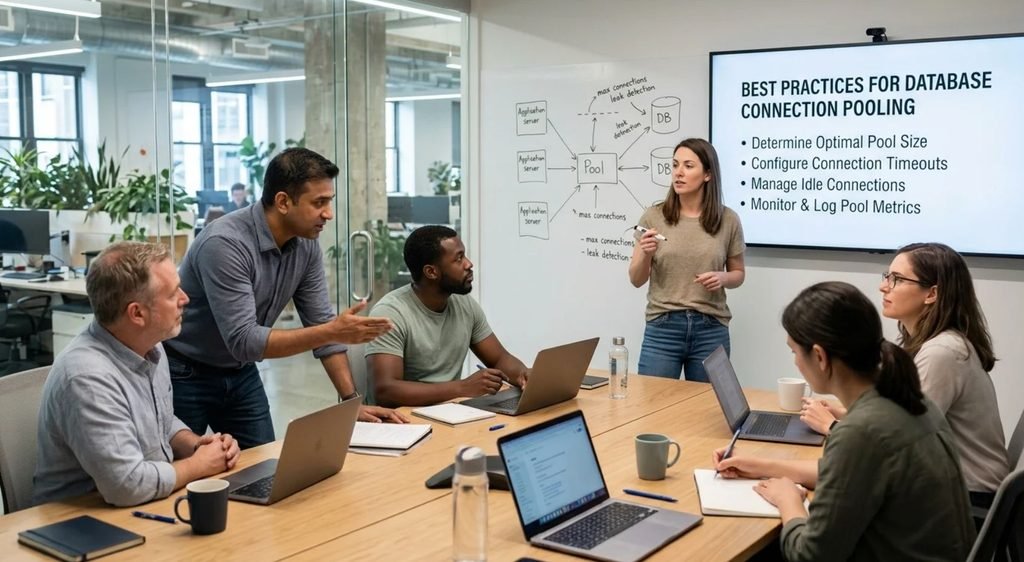
8 Database Connection Pooling Best Practices
1. Choose an Appropriate Connection Pool Size
The maximum pool size determines how many connections a pool can maintain concurrently. Setting it too low may create long wait times, while setting it too high can increase database load and memory usage.
Start with a reasonable limit, then measure pool utilization, connection acquisition time, query latency, and database resource usage under realistic workloads. Increase the pool gradually only when the evidence shows that connection capacity is the bottleneck.
Avoid assuming that more connections always mean better performance. Slow queries, long-running transactions, or limited database capacity may be the real problem.
2. Configure Connection, Idle, and Lifetime Timeouts
Timeouts prevent requests and connections from remaining occupied indefinitely. Configure them according to your application’s workload and the database infrastructure’s limits.
Common settings include:
- Connection timeout: The maximum time a request waits to obtain a connection.
- Idle timeout: How long an unused connection can remain in the pool before being removed, where supported.
- Maximum connection lifetime: How long a connection can remain in the pool before retirement.
- Minimum pool size: The minimum number of connections the pool attempts to maintain, depending on the implementation.
For Java applications using HikariCP, consult the official HikariCP configuration documentation for settings such as connectionTimeout, idleTimeout, maxLifetime, minimumIdle, and maximumPoolSize.
Do not copy timeout values blindly. Coordinate application settings with database, proxy, and network timeouts to avoid unnecessary connection churn or stale connections.
3. Always Release Connections After Use
A connection leak occurs when an application borrows a connection but fails to return it to the pool. Over time, leaked connections can leave no available capacity, even when the database itself is healthy.
Use resource-management features that release connections reliably, including Java’s try-with-resources or C#’s using statement. Ensure connections are returned after successful operations and when exceptions occur.
Also, keep the connection lifecycle clear: closing a pooled connection usually returns it to the pool rather than physically closing the underlying database connection. The exact behavior depends on the driver or framework.
4. Monitor Pool Utilization and Wait Times
Monitor the pool alongside the database. Useful metrics include:
- Active connections currently in use.
- Idle connections available for reuse.
- Connection acquisition time and requests waiting for connections.
- Connection creation failures and connection pool exhaustion events.
- Query latency, database CPU, memory, and transaction duration.
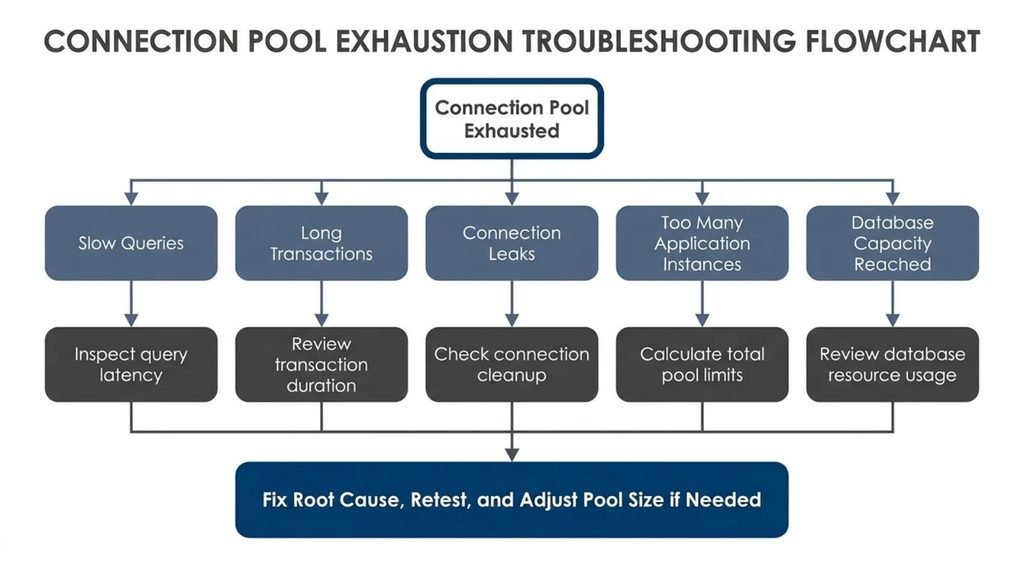
If the pool is consistently full and requests wait for connections, investigate whether queries are slow, transactions hold connections too long, or the configured pool limit is insufficient. If the pool is mostly idle, increasing its size may not help.
5. Validate Connections and Handle Stale Connections
Connections can become unusable because of network interruptions, database restarts, or infrastructure timeouts. Appropriate connection validation and stale-connection handling help prevent failed requests.
Prefer validation mechanisms supported by your driver or pooling library. For JDBC, this may include Connection.isValid(), depending on driver support. Avoid running an expensive validation query for every checkout unless your workload and library require it.
Configure connection lifetimes and validation based on the behavior of your database and infrastructure. Validation settings should complement—not replace—proper error handling and connection cleanup.
6. Keep Queries and Transactions Efficient
A connection remains occupied while an application uses it. Slow queries and unnecessarily long transactions therefore reduce the number of connections available to other requests.
Optimize expensive queries, avoid unnecessary round trips, and keep transactions as short as correctness allows. Do not hold a connection while performing unrelated work, such as waiting for an external API response.
Where appropriate, review indexing and query plans to reduce database execution time.
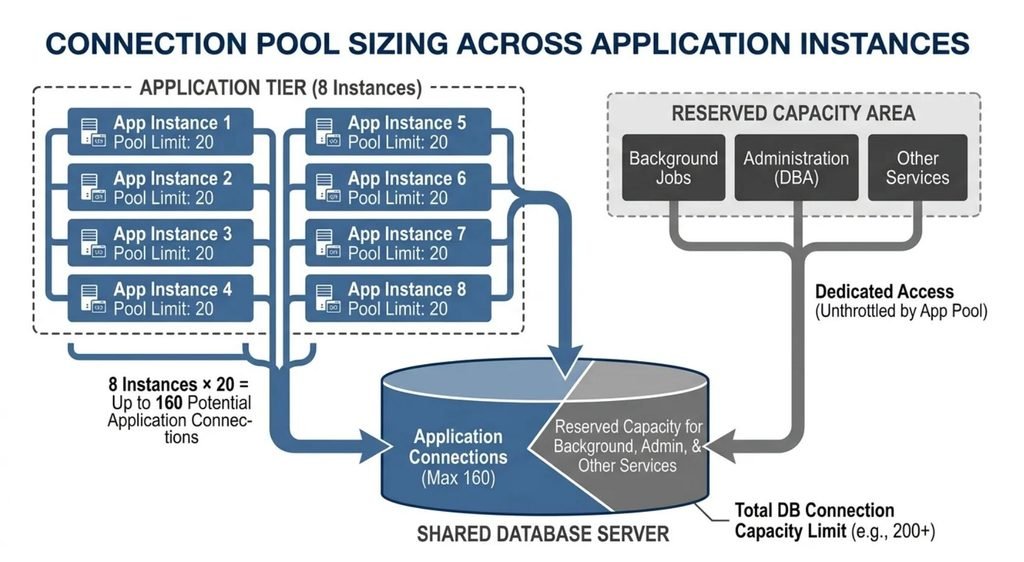
7. Account for Multiple Application Instances
A common configuration mistake is setting a pool size for one application instance without accounting for every instance running in production.
Calculate the potential total connection demand using this planning formula:
Potential connections = Number of application instances × Maximum pool size per instance
For example, eight instances with a maximum pool size of 20 could collectively request up to 160 connections. Other services, administrative sessions, background workers, and database processes may also consume connection capacity.
Treat this calculation as an upper-bound planning estimate, not a guarantee that every connection will be opened simultaneously. Compare it with the database’s available connection budget and leave appropriate capacity for other workloads.
8. Test Settings Under Realistic Workloads
Do not finalize pool settings using local development traffic alone. Test with realistic concurrency, query patterns, transaction durations, and the expected number of application instances.
During load testing, observe pool utilization, request latency, database CPU, wait times, and connection failures. Test both normal traffic and short bursts to identify whether the pool recovers appropriately after demand decreases.
Increase the pool gradually and compare results after each change. A larger pool is useful only when it improves throughput or latency without overloading the database.
How to Determine the Right Database Connection Pool Size
There is no universal optimal connection pool size. The right setting depends on database capacity, query performance, workload concurrency, connection-holding time, and the number of application instances.
Use monitoring and load testing to determine whether requests are waiting for connections or whether the database is already saturated. A full pool does not automatically mean the pool is too small; it may indicate slow queries, connection leaks, or long transactions.
Use these settings as a starting point for evaluation:
| Setting | What to consider |
|---|---|
| Minimum pool size | Expected baseline demand and the cost of keeping idle connections available. |
| Maximum pool size | Database capacity, workload concurrency, and connections needed by other services. |
| Connection timeout | How long a request can reasonably wait before failing. |
| Idle timeout | Whether unused connections should be retired during quieter periods. |
| Maximum connection lifetime | Database, proxy, and network policies for connection retirement. |
In HikariCP, settings such as setMaximumPoolSize, setMinimumIdle, and setIdleTimeout let Java applications configure pool behavior. Consult the library’s official documentation because supported options and their interactions depend on the implementation.
How to Prevent Connection Pool Exhaustion
Connection pool exhaustion happens when all available connections are in use and new requests cannot obtain one. Depending on the application, requests may wait until a pool timeout occurs or return an error.
Start troubleshooting by checking active and idle connection counts, connection wait times, query latency, and transaction duration. Look for connection leaks, slow SQL queries, long transactions, sudden traffic spikes, and excessive connection demand across application instances.
If the database is already under heavy load, increasing the maximum pool size can make the problem worse. Fix the underlying bottleneck first, then adjust pool capacity if measurements show it is necessary.
Application-Level Pooling vs. External Connection Poolers
Application-level pooling manages connections inside the application or its database driver. An external connection pooler sits between applications and the database, managing connections through a separate service.
External poolers can be useful when many application instances would otherwise create too many database connections. However, their benefits and limitations depend on the database, transaction behavior, and pooling mode.
For PostgreSQL, PgBouncer’s official documentation explains its pooling modes. Review the PgBouncer configuration documentation before choosing a mode, especially when applications depend on session-level database behavior.
| Approach | Best suited for | Main consideration |
|---|---|---|
| Application-level connection pooling | Most applications using a supported database driver or framework. | Each application instance may maintain its own pool. |
| External connection pooler | Workloads with many clients or a need to centralize connection management. | Session behavior and transaction compatibility depend on the pooler and its configuration. |
External pooling does not remove the need for sensible application-level limits, efficient queries, or reliable connection cleanup.
Database Connection Pooling Best Practices by Technology
The core principles remain similar across databases, but configuration details differ by driver and platform.
- Java and JDBC: Libraries such as HikariCP provide configurable pool sizing, timeouts, and connection management. Check the library documentation for the exact behavior of each setting.
- PostgreSQL: Consider application-level pooling or an external pooler such as PgBouncer, depending on connection demand and session requirements.
- SQL Server and .NET: ADO.NET supports connection pooling. Its official documentation describes pool behavior and configurable settings, including the maximum pool size.
- MongoDB: The official MongoDB connection pool performance-tuning guide covers pool tuning for MongoDB clients. Follow the guidance for your driver and version.
Always verify defaults for the specific driver, framework, and version you use rather than assuming all databases handle pooling identically.
Common Connection Pooling Mistakes to Avoid
One common mistake is increasing the maximum pool size every time requests slow down. This can hide the real issue and overwhelm the database. Check query latency and resource usage before increasing connection limits.
Another mistake is holding connections while performing unrelated work. This reduces pool availability and increases the risk of connection pool exhaustion. Release connections promptly and keep transactions short.
Do not confuse a thread pool with a database connection pool. A thread pool manages concurrent execution, while a connection pool manages database connections. Increasing the number of application threads does not automatically mean the database needs the same number of connections.
Finally, do not configure each application instance in isolation. Calculate aggregate connection demand, monitor the entire system, and test changes under realistic workloads.
Frequently Asked Questions
How do you optimize connection pooling?
Choose a suitable connection pool size, configure timeouts, release connections reliably, and monitor wait times, query latency, and database load.
How do you determine the optimal database connection pool size?
Use load testing and monitoring to evaluate concurrency, connection-holding time, pool wait times, and database capacity. Adjust gradually based on measured results.
What happens if your database connection pool is full?
New requests must wait for an available connection or fail when the configured connection acquisition timeout expires.
How many SQL connections are too many?
There is no universal limit. Too many connections are those that exceed the database’s capacity or reduce performance; account for every application instance and other database clients.
What is the maximum pool size for SQL Server connections?
For ADO.NET SQL Server connection pooling, the documented default maximum pool size is 100. The effective value depends on the connection string and configuration. See Microsoft’s documentation.
What is the difference between application-level pooling and external pooling?
Application-level pooling manages connections inside the application or driver. External pooling uses a separate service to manage database connections across clients, with behavior depending on the pooler’s configuration.
Conclusion
Effective database connection pooling is about balancing connection availability with database capacity. A well-configured pool can reduce connection setup overhead, but oversized pools, slow queries, long transactions, and connection leaks can still hurt performance.
Start by measuring pool utilization, connection wait times, query latency, and database load. Configure appropriate pool sizes and timeouts, release connections reliably, and test changes under realistic workloads. These database connection pooling best practices provide a practical foundation for building reliable applications without overwhelming your database server.