Artificial intelligence has become incredibly good at generating text, writing code, answering questions, and solving problems. But have you ever noticed something interesting?
Some AI assistants remember your preferences, continue previous conversations, and even adapt to your working style over time. Others seem to forget everything the moment you start a new chat.
Why does this happen?
The answer lies in AI agent memory.
Memory is one of the biggest differences between a simple chatbot and an intelligent AI agent. Without memory, an AI starts from scratch every time you ask a question. With memory, it can recall previous interactions, understand long-term goals, learn user preferences, and make better decisions.
As AI agents become more common in customer support, coding assistants, healthcare, finance, and automation, memory is quickly becoming one of the most important building blocks of modern AI systems.
In this guide, you’ll learn how AI Agents Use Memory , why it matters, the different types of AI memory, how memory works behind the scenes, and how developers build memory-enabled AI agents using modern frameworks like LangChain, LangGraph, Redis, and Mem0.
AI Agent Memory?
Imagine asking a friend for advice every day, but they completely forget every previous conversation. You’d have to repeat your name, preferences, goals, and the entire context each time. It would quickly become frustrating.
That’s exactly how most AI systems behave without memory.
AI agent memory is the ability of an AI agent to store, organize, retrieve, and reuse information from previous interactions or experiences. Instead of treating every request as completely new, the agent can remember important details, learn from past actions, and use that knowledge to make better decisions in future conversations.
In simple words, how AI agents use memory comes down to one goal: helping the AI understand the past so it can respond more intelligently in the present.
Unlike traditional software that follows fixed rules, modern AI agents use memory to maintain context, personalize responses, and adapt to changing situations. This makes them far more useful for long-running tasks such as customer support, coding assistance, travel planning, research, and workflow automation.
For example, imagine you’re using an AI travel assistant.
During your first conversation, you tell the agent that you always prefer window seats, direct flights, and four-star hotels. If the AI has no memory, you’ll need to repeat these preferences every time you book a trip.
However, if the AI agent has a memory system, it stores those preferences and automatically applies them to future bookings. Instead of asking the same questions again, it focuses on finding the best options based on what it already knows about you.
This is a practical example of how AI agents use memory to deliver a faster, smarter, and more personalized experience.
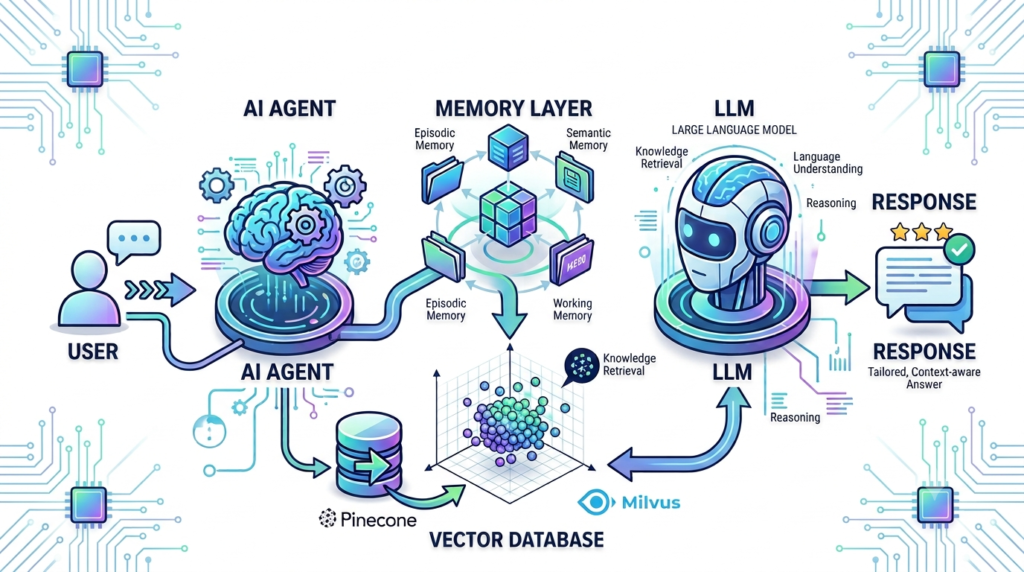
It’s important to understand that Large Language Models (LLMs) like GPT, Claude, or Llama do not permanently remember information on their own. They generate responses based on the input they receive during a conversation. To make an AI agent remember information across multiple sessions, developers add an external memory layer that stores important data and retrieves it whenever it’s relevant.
Think of the LLM as the brain that reasons, while the memory system acts as the long-term notebook that keeps track of useful information over time. Together, they allow AI agents to behave more like intelligent assistants rather than one-time chatbots.
Why Do AI Agents Need Memory?
If you’ve ever used a basic chatbot, you’ve probably noticed one major limitation—it often forgets everything once the conversation ends. Every new chat feels like starting over, even if you’ve shared the same information multiple times.
Modern AI agents are designed to solve this problem through memory.
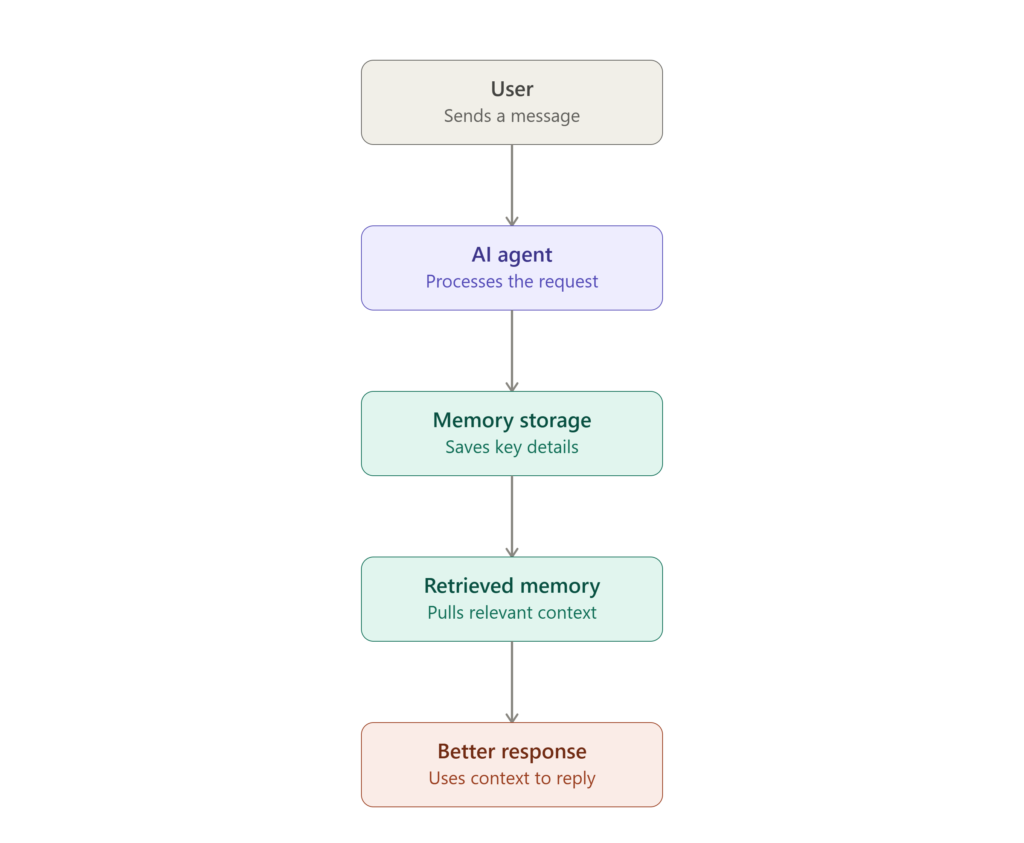
Memory allows an AI agent to go beyond answering isolated questions. Instead, it can build on previous interactions, remember user preferences, track progress toward goals, and make decisions based on historical information. This transforms AI from a simple question-answering tool into a long-term digital assistant.
In other words, how AI agents use memory determines whether they simply respond to prompts or continuously improve with experience.
Without Memory vs With Memory
Consider two AI coding assistants.
Assistant A (Without Memory)
You ask it to help build a React application. It explains how to create components and routing. The next day, you return to continue the project, but the assistant has forgotten everything. You must explain the project structure, chosen libraries, coding style, and previous decisions all over again.
Assistant B (With Memory)
The assistant remembers that you’re building a React application using TypeScript and Tailwind CSS. It recalls that you prefer functional components, already configured authentication, and are currently working on the dashboard page. Instead of repeating old discussions, it immediately helps you continue where you left off.
This is a perfect example of how AI agents use memory to create a smoother and more productive user experience.
Memory Makes AI More Human-Like
Human intelligence relies heavily on memory.
When you meet a close friend, they don’t ask for your name every time. They remember your hobbies, past conversations, and important experiences you’ve shared together.
AI agents aim to achieve something similar.
Instead of processing every request in isolation, they can remember useful information such as:
- Your preferred writing style
- Frequently used programming languages
- Past purchases
- Favorite travel destinations
- Previous support tickets
- Long-term project goals
- Recent conversations
The result is an AI assistant that feels more natural, personalized, and efficient.
Real-World Example
Imagine you’re planning an international vacation with an AI travel agent.
During your first conversation, you mention that you:
- Prefer direct flights
- Like aisle seats
- Stay in four-star hotels
- Travel with your family
- Have a budget of $2,500
Several weeks later, you ask the same AI to book another trip.
Without memory, it asks every question again.
With memory, it already knows your travel preferences and immediately recommends flights and hotels that match your needs.
Instead of wasting time collecting the same information, the AI focuses on finding the best options.
This simple scenario shows how AI agents use memory to improve both speed and personalization.
Memory Helps AI Learn from Experience
Another important reason AI agents need memory is continuous improvement.
Imagine an AI customer support agent.
On Monday, it helps a customer fix a login issue.
On Wednesday, the same customer returns with a similar problem.
A memory-enabled AI remembers:
- The customer’s previous issue
- The troubleshooting steps already attempted
- The successful solution
- Customer preferences
- Device information
Instead of repeating unnecessary steps, it provides a faster and more accurate solution.
This ability to learn from previous interactions makes AI agents significantly more valuable in real-world applications.
Memory Enables Long-Term Goals
Many modern AI agents work on tasks that take days, weeks, or even months to complete.
Examples include:
- Managing software development projects
- Tracking fitness goals
- Planning business strategies
- Conducting academic research
- Monitoring financial investments
- Automating customer support workflows
Without memory, these long-term tasks become nearly impossible because the AI loses track of previous progress.
Memory enables the agent to remember objectives, completed milestones, pending tasks, and future actions, allowing it to work consistently over extended periods.
Why Memory Matters More as AI Becomes Smarter
Today’s AI agents don’t just answer questions—they can search the web, call APIs, write code, generate reports, analyze documents, and automate complex workflows.
As these capabilities expand, memory becomes even more important.
A powerful AI agent isn’t defined only by how well it reasons. It’s also defined by how effectively it remembers, retrieves, and applies past knowledge.
That’s why memory is considered one of the core building blocks of next-generation AI systems.
How AI Agent Memory Works (Step-by-Step)
At first glance, AI agent memory might seem similar to human memory, but the process is actually very systematic. Instead of “remembering” naturally, an AI agent follows a sequence of steps every time it interacts with a user.
Understanding this workflow helps explain why modern AI agents feel much smarter than traditional chatbots.
Step 1: The AI Receives Your Input
Everything starts when a user sends a message.
For example:
“Book me a hotel in Dubai next month.”
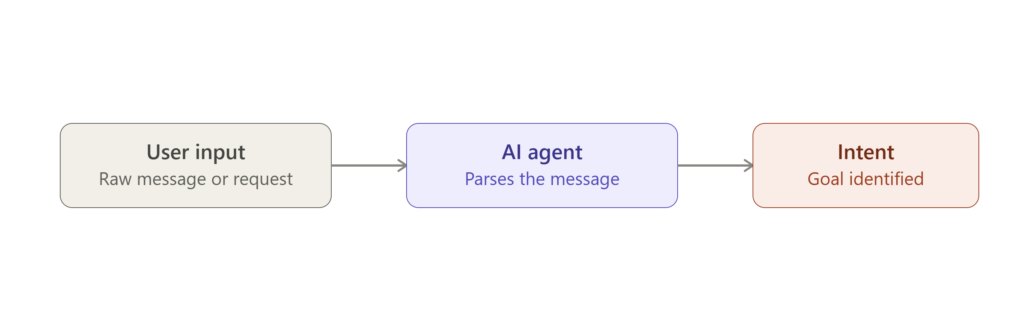
The AI agent first analyzes the request using a Large Language Model (LLM). It identifies the user’s intent, extracts important details, and determines what information it already has versus what it needs.
At this stage, the AI itself doesn’t remember anything permanently.
Step 2: The Memory System Searches for Relevant Information
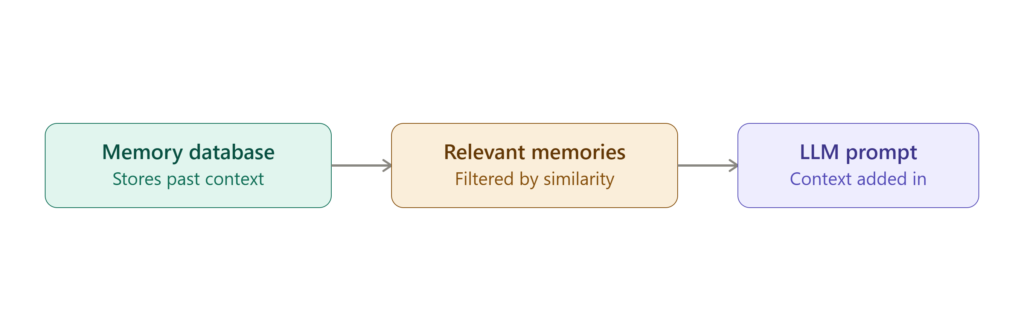
Instead of answering immediately, the AI checks its memory system.
It searches for useful information such as:
- Previous conversations
- User preferences
- Saved profile details
- Past decisions
- Relevant documents
- Knowledge stored in a vector database
For example, it may already know:
- You prefer window seats.
- You usually book 4-star hotels.
- Your budget is under $150 per night.
Rather than asking the same questions again, the AI retrieves this information automatically.
This retrieval process usually takes only milliseconds.
Step 3: Relevant Memories Are Added to the Prompt
The retrieved memories are not directly “loaded into the AI’s brain.”
Instead, they are inserted into the prompt sent to the Large Language Model.
For example, instead of receiving only:
“Book me a hotel in Dubai.”
The LLM actually receives something closer to:
- User prefers 4-star hotels
- Budget: Under $150
- Previous trip was for business
- Current request: Dubai next month
Because of this extra context, the response becomes significantly more personalized.
Step 4: The AI Generates a Personalized Response
Now the language model has everything it needs.
It combines:
- The user’s current request
- Retrieved memories
- External knowledge (if needed)
- Reasoning abilities
Then it generates the final response.
Instead of asking repetitive questions, it might respond:
“I found several 4-star hotels in Dubai within your usual budget. Would you like options near Downtown Dubai or Dubai Marina?”
This feels natural because the AI remembered previous preferences.
Step 5: Important Information Gets Stored Again
After the conversation ends, the memory system decides whether anything is worth remembering.
Not every sentence is saved.
Good AI memory systems store only meaningful information, such as:
- New preferences
- Important decisions
- Frequently used settings
- Long-term goals
- User feedback
For example:
“I now prefer aisle seats.”
This preference may be stored for future interactions.
Meanwhile, temporary details like:
“Thanks.”
are ignored because they provide no long-term value.
This selective storage keeps the memory system efficient and prevents unnecessary data from accumulating.
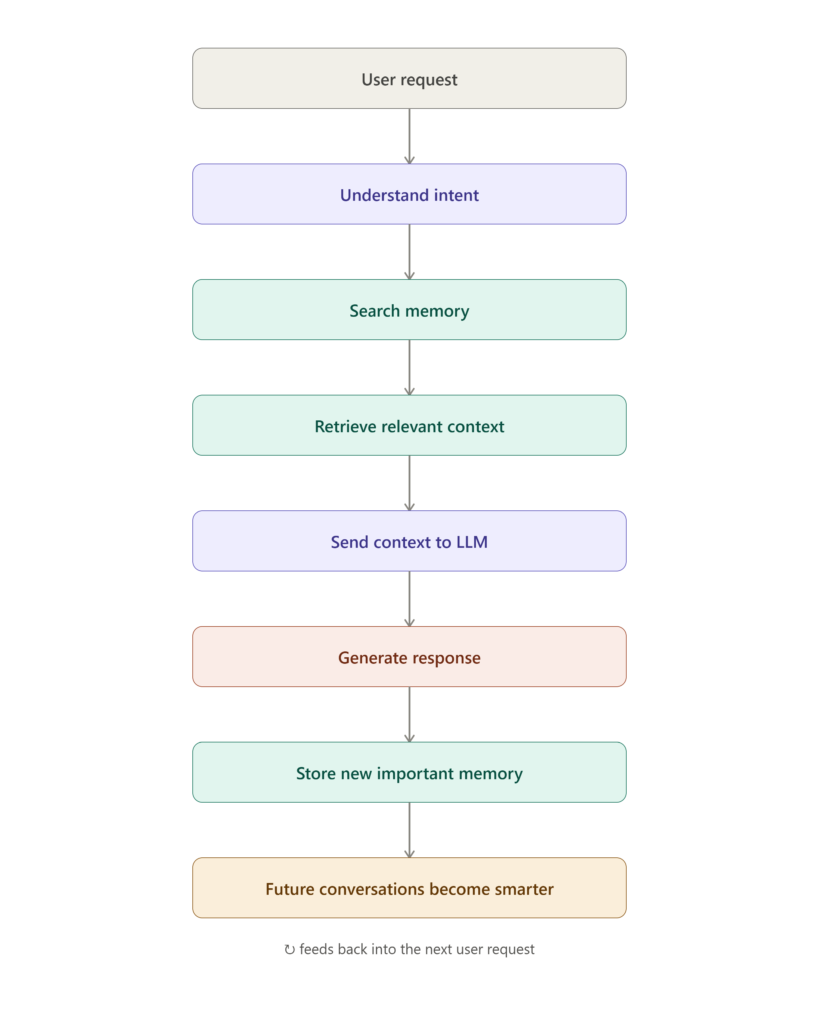
The Complete AI Agent Memory Workflow
Here’s the complete process in a simplified form:
- User sends a request.
- AI understands the intent.
- Memory system searches for relevant information.
- Important memories are retrieved.
- Retrieved memories are added to the prompt.
- The LLM generates a context-aware response.
- New important information is stored for future use.
This continuous loop enables AI agents to become more helpful, personalized, and context-aware over time.
Types of AI Agent Memory
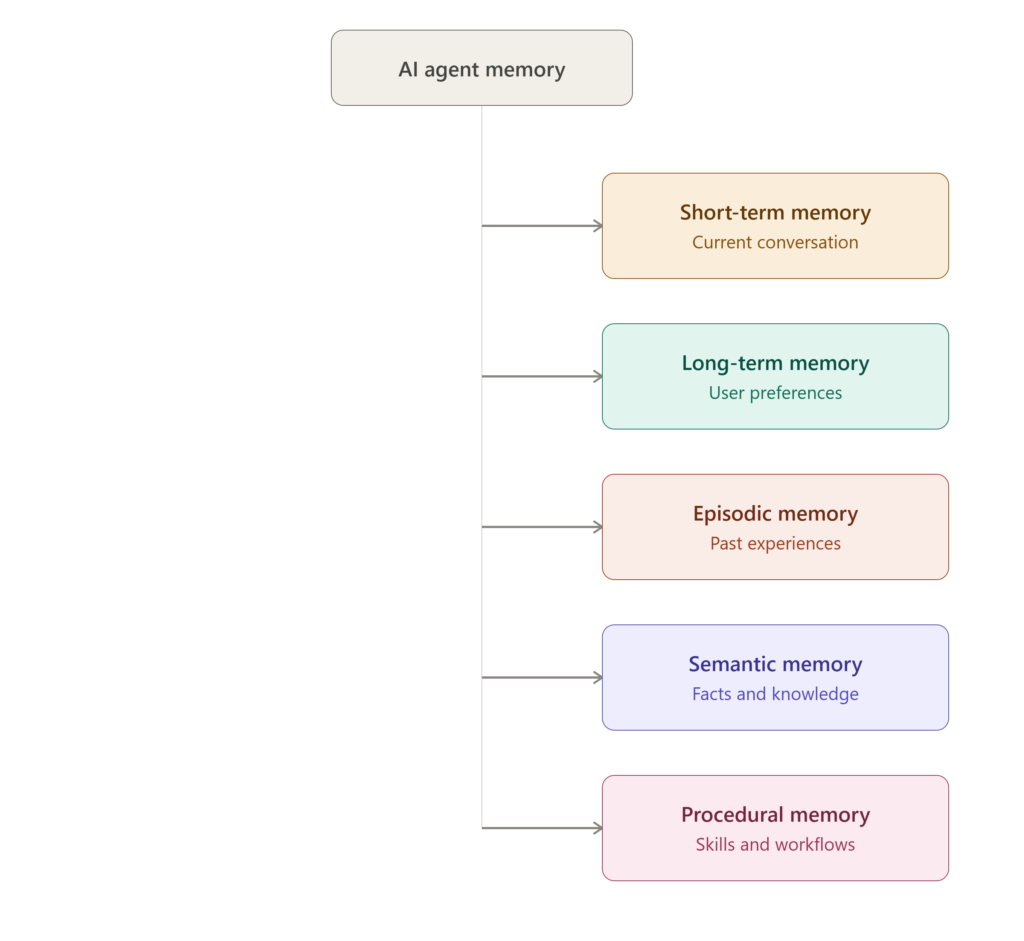
Not all memories serve the same purpose. Just as humans use different types of memory for different situations, AI agents also rely on multiple memory systems to perform tasks effectively.
One memory type helps an AI remember the current conversation, while another stores user preferences for months. Some memories store factual knowledge, while others help AI learn from past experiences.
Understanding these memory types makes it easier to see how modern AI agents become more intelligent over time.
1. Short-Term Memory (Working Memory)
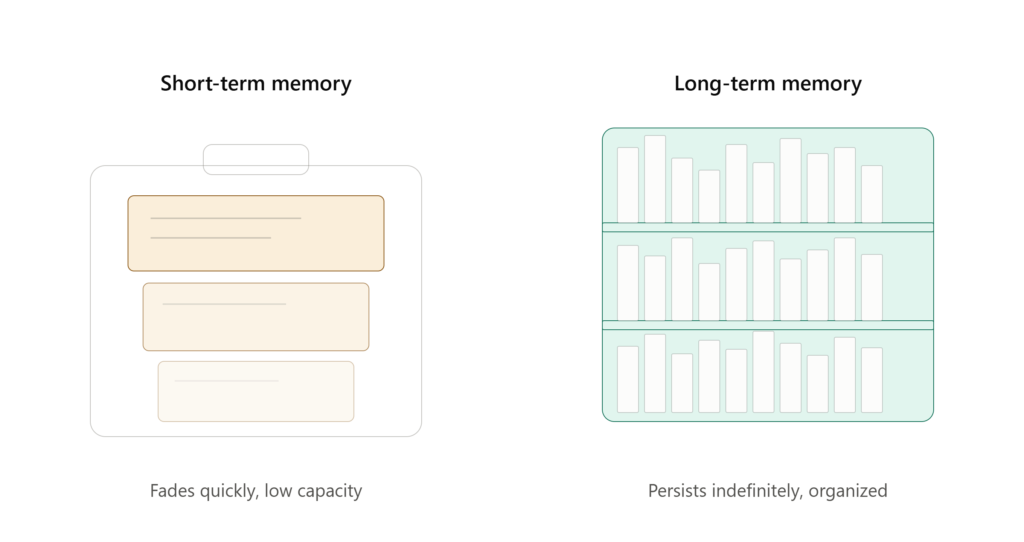
Short-term memory stores information that an AI agent needs right now.
It only exists during the current conversation or task. Once the interaction ends, this memory is usually discarded unless important information is saved elsewhere.
Think of it like a whiteboard. The AI writes temporary information on it while working and erases it when the task is finished.
For example, imagine you’re chatting with an AI travel assistant.
You:
“I want to visit Japan in October.”
A few messages later, you ask:
“How much will it cost?”
The AI understands that “it” refers to the Japan trip because that information is still in its short-term memory.
Without short-term memory, the AI would ask:
“What are you referring to?”
That’s why short-term memory is essential for maintaining natural, flowing conversations.
Common Uses
- Remembering recent messages
- Following multi-step instructions
- Maintaining conversation context
- Tracking ongoing tasks
2. Long-Term Memory
Long-term memory stores information that remains useful across multiple conversations and sessions.
Instead of forgetting everything after the chat ends, the AI remembers details that improve future interactions.
Examples include:
- Your preferred writing style
- Favorite programming language
- Frequently visited locations
- Business goals
- Communication preferences
For instance, if you always ask for simple explanations with code examples, an AI agent with long-term memory can automatically adapt its responses without you repeating the same instructions every time.
This creates a much more personalized experience.
3. Episodic Memory
Episodic memory allows an AI agent to remember specific past events.
Instead of storing general facts, it remembers experiences.
For example:
- Last month, you built an AI chatbot.
- Yesterday, you fixed a bug in your React application.
- Last week, you deployed your website to Vercel.
Later, the AI can refer back to these experiences.
For example:
“During your previous deployment, you had an environment variable issue. Let’s check that first.”
This ability helps AI make better decisions based on previous outcomes instead of treating every task as completely new.
Real-World Examples
- AI coding assistants
- Customer support systems
- Financial advisors
- Personal productivity assistants
4. Semantic Memory
Semantic memory stores facts, concepts, and general knowledge rather than personal experiences.
This is similar to how humans remember information like:
- Paris is the capital of France.
- Python is a programming language.
- Water freezes at 0°C.
For AI agents, semantic memory often includes:
- Company documentation
- Product information
- Technical manuals
- Medical guidelines
- Legal regulations
- Internal knowledge bases
When users ask factual questions, the AI retrieves this stored knowledge to generate accurate responses.
Unlike episodic memory, semantic memory isn’t tied to a specific event—it focuses on general knowledge.
5. Procedural Memory
Procedural memory helps an AI remember how to perform tasks.
Instead of remembering facts or conversations, it stores processes and workflows.
Examples include:
- How to deploy an application
- How to process customer refunds
- How to generate invoices
- How to analyze uploaded documents
- How to execute a multi-step automation
As the AI completes more tasks, it can optimize these procedures, reducing unnecessary steps and improving efficiency.
This type of memory is especially important in autonomous AI agents that perform repetitive business operations.
AI Agent Memory Types at a Glance
| Memory Type | Purpose | Example |
|---|---|---|
| Short-Term Memory | Remembers current conversation | Understanding what “it” refers to in a chat |
| Long-Term Memory | Stores information across sessions | Remembering your preferred writing style |
| Episodic Memory | Remembers specific experiences | Recalling last week’s coding project |
| Semantic Memory | Stores factual knowledge | Knowing Python supports object-oriented programming |
| Procedural Memory | Stores learned workflows | Following the steps to deploy a web application |
Why AI Agents Need Multiple Memory Types
No single memory type is enough for building intelligent AI agents.
Imagine an AI assistant that only had short-term memory. It could hold a conversation but would forget everything after the session ended.
Now imagine an AI with only long-term memory. It might remember your preferences but struggle to follow the flow of your current conversation.
Modern AI agents combine multiple memory systems so they can:
- Maintain context during conversations
- Personalize responses over time
- Learn from previous experiences
- Retrieve factual knowledge instantly
- Perform complex workflows efficiently
By working together, these memory types transform AI from a simple chatbot into an adaptive digital assistant that continuously improves with use.
Real-World Applications of AI Agent Memory
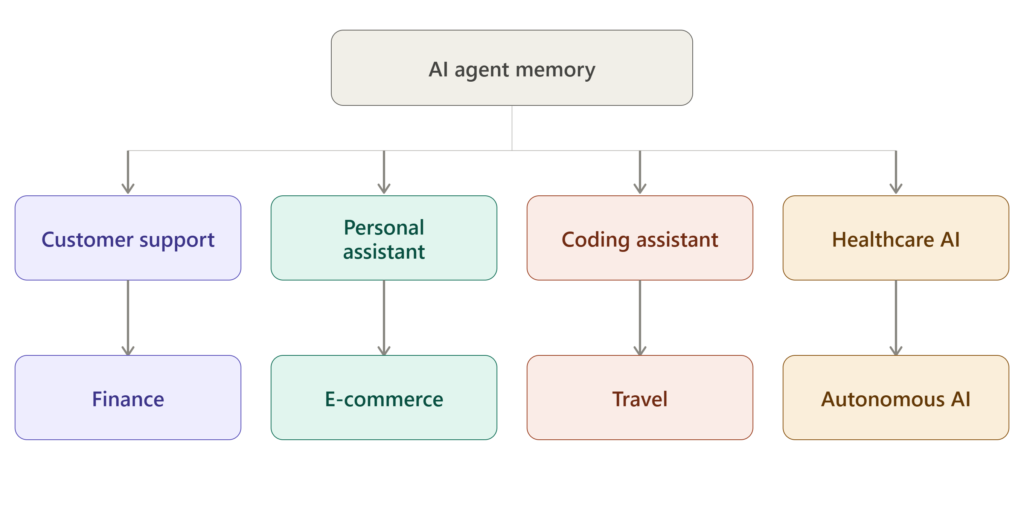
AI agent memory isn’t just a research concept—it’s already powering many of the AI systems people use every day. From virtual assistants to coding tools and healthcare platforms, memory enables AI agents to provide personalized, context-aware, and intelligent experiences.
Let’s explore how AI agent memory is used across different industries.
1. AI Customer Support Agents
One of the most common applications of AI agent memory is customer support.
Traditional chatbots often ask customers to repeat the same information every time they start a new conversation.
AI agents with memory work differently.
They can remember:
- Previous support tickets
- Past purchases
- Preferred communication language
- Subscription plans
- Earlier troubleshooting steps
Example
Imagine contacting an internet service provider.
Instead of asking,
“Can you explain the problem again?”
the AI responds:
“I can see your connection issue from yesterday wasn’t fully resolved. Let’s continue where we left off.”
This creates a smoother and more satisfying customer experience.
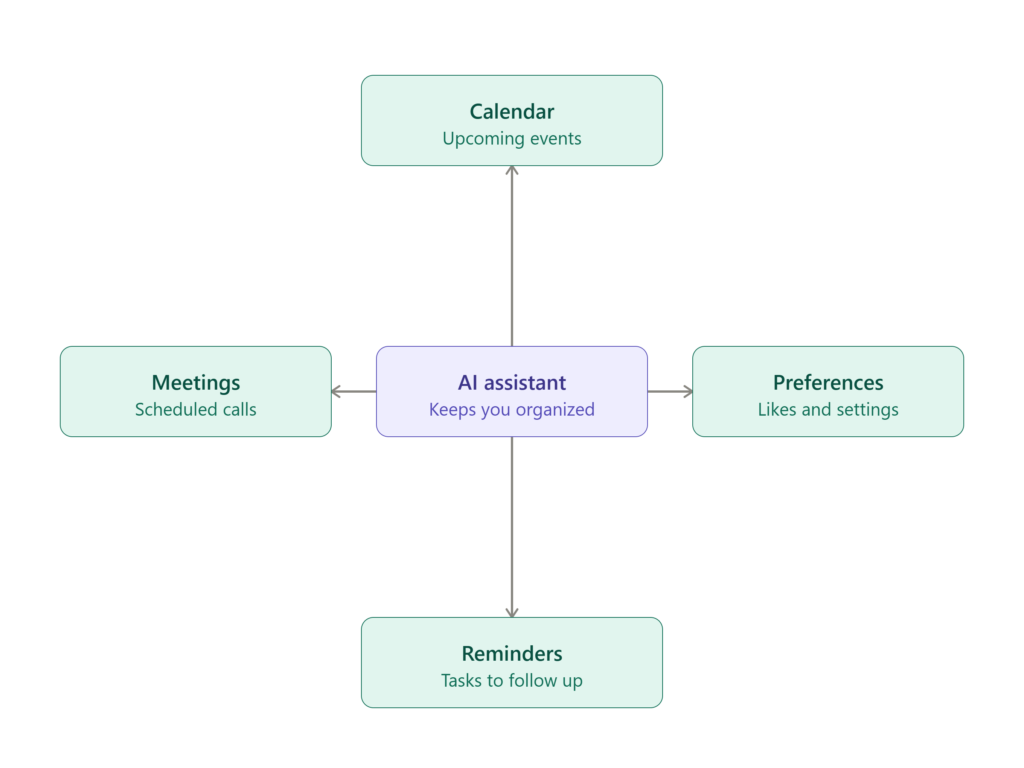
2. Personal AI Assistants
Modern AI assistants become significantly more useful when they remember personal preferences.
Rather than treating every conversation as brand new, they gradually learn how you like to work.
For example, an AI assistant might remember:
- Your daily schedule
- Favorite restaurants
- Writing style
- Frequently used applications
- Meeting preferences
Over time, the assistant becomes more personalized without requiring repeated instructions.
Example
Instead of asking every Monday,
“What time should I schedule your weekly meeting?”
the AI already knows your preferred schedule.
3. AI Coding Assistants
Developers interact with coding assistants hundreds of times every week.
Without memory, the assistant would repeatedly ask about the project’s programming language, framework, or coding style.
Memory changes that.
An AI coding assistant can remember:
- Project architecture
- Coding conventions
- Folder structure
- Preferred libraries
- Previous bug fixes
Example
Suppose you’re building a Next.js application.
After several interactions, the AI already knows:
- You use TypeScript.
- Tailwind CSS is your preferred styling framework.
- Authentication uses Better Auth.
- Database operations use Prisma.
Instead of explaining these details repeatedly, you can immediately ask:
“Create the dashboard page.”
The AI understands the project’s existing structure and generates code accordingly.
4. Healthcare AI Systems
Healthcare AI benefits greatly from long-term memory.
Medical assistants can securely remember:
- Patient history
- Allergies
- Current medications
- Previous diagnoses
- Treatment plans
This allows healthcare professionals to receive more relevant recommendations while reducing repetitive data entry.
For example, if a patient is allergic to penicillin, the AI can consider this information before suggesting treatment options.
Note: In real healthcare systems, patient memory must comply with privacy regulations such as HIPAA or GDPR.
5. AI Financial Advisors
Financial planning depends heavily on historical information.
AI financial agents use memory to remember:
- Investment goals
- Risk tolerance
- Monthly expenses
- Previous portfolio decisions
- Retirement plans
Instead of starting from scratch during every consultation, the AI builds upon previous discussions.
This leads to more personalized financial advice.
6. E-Commerce and Shopping Assistants
Online shopping platforms increasingly rely on AI agent memory.
These assistants can remember:
- Favorite brands
- Clothing sizes
- Purchase history
- Budget preferences
- Frequently bought products
Example
If you regularly purchase running shoes from the same brand, the AI might recommend the newest model without you searching for it.
This improves product discovery while creating a personalized shopping experience.
7. AI Travel Assistants
Planning a trip involves dozens of small decisions.
AI travel agents use memory to remember:
- Preferred airlines
- Seat preferences
- Hotel ratings
- Visa information
- Travel history
Example
When you ask:
“Book my flight to Singapore.”
The AI may already know:
- You prefer window seats.
- You usually fly in the evening.
- Your loyalty program is with a specific airline.
Instead of asking multiple follow-up questions, it immediately provides suitable recommendations.
8. Autonomous AI Agents
Advanced AI agents perform tasks with minimal human supervision.
Examples include:
- Research agents
- Workflow automation agents
- Business process automation
- Multi-agent systems
Memory enables these agents to:
- Track completed tasks
- Remember previous decisions
- Avoid repeating mistakes
- Coordinate with other AI agents
- Improve planning over time
Without memory, autonomous agents would lose context after every action, making complex automation nearly impossible.
Why AI Agent Memory Matters in the Real World
Across every industry, the biggest advantage of AI agent memory is continuity.
Instead of treating every interaction as isolated, AI agents can build on previous knowledge, making conversations feel more natural and productive.
Organizations that implement effective memory systems can deliver:
- Faster customer support
- Better personalization
- More accurate recommendations
- Reduced repetitive interactions
- Smarter automation
- Improved user satisfaction
As AI becomes more integrated into everyday software, memory will play a critical role in making AI agents feel less like tools and more like intelligent collaborators.
How Developers Build AI Agent Memory
Now that you understand what AI agent memory is and where it’s used, you might be wondering:
How do developers actually build memory into AI agents?
The answer is simple: Large Language Models (LLMs) don’t remember anything by themselves. Developers create an additional memory layer that stores, retrieves, and updates information whenever the AI interacts with a user.
Let’s look at the core building blocks behind modern AI agent memory.
1. Memory Storage
Every AI agent needs a place to store information.
Instead of keeping everything inside the language model, developers save memories in external storage systems.
Depending on the application, this storage might contain:
- User preferences
- Conversation summaries
- Past interactions
- Business data
- Knowledge bases
- Task history
When the user returns, the AI retrieves the relevant information from storage before generating a response.
This approach makes memory persistent, meaning it survives even after the conversation ends.
2. Vector Embeddings
Computers don’t naturally understand language the way humans do.
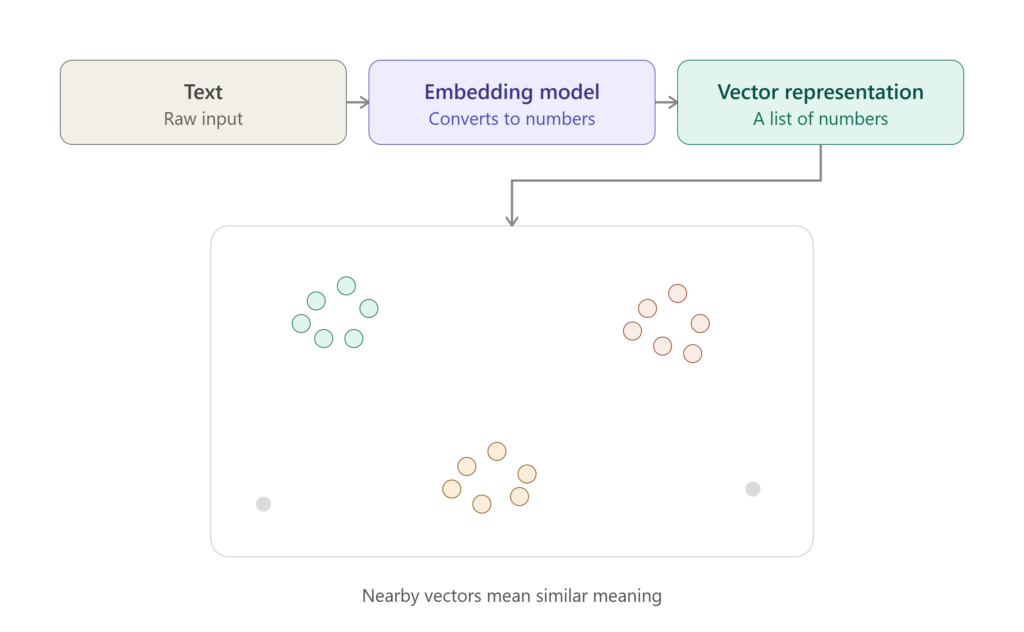
To make information searchable, developers convert text into vector embeddings.
A vector embedding is a numerical representation of text that captures its meaning.
For example, these sentences are different but have nearly the same meaning:
- “Book a hotel in Dubai.”
- “Reserve accommodation in Dubai.”
After converting them into embeddings, they appear very close together in vector space.
This allows AI agents to search based on meaning rather than exact keywords.
3. Vector Databases
Once memories become embeddings, they need somewhere to live.
That’s where vector databases come in.
Unlike traditional databases that search for exact matches, vector databases search for information based on semantic similarity.
For example, when a user asks:
“What hotel did I book last time?”
The AI searches the vector database for memories related to previous hotel bookings—even if the wording is completely different.
Popular vector databases include:
- Pinecone
- Weaviate
- Milvus
- Qdrant
- Chroma
- Redis Vector Search
These databases make memory retrieval fast, even when storing millions of records.
4. Memory Retrieval
Storing memories isn’t enough.
The AI also needs to retrieve the right memory at the right time.
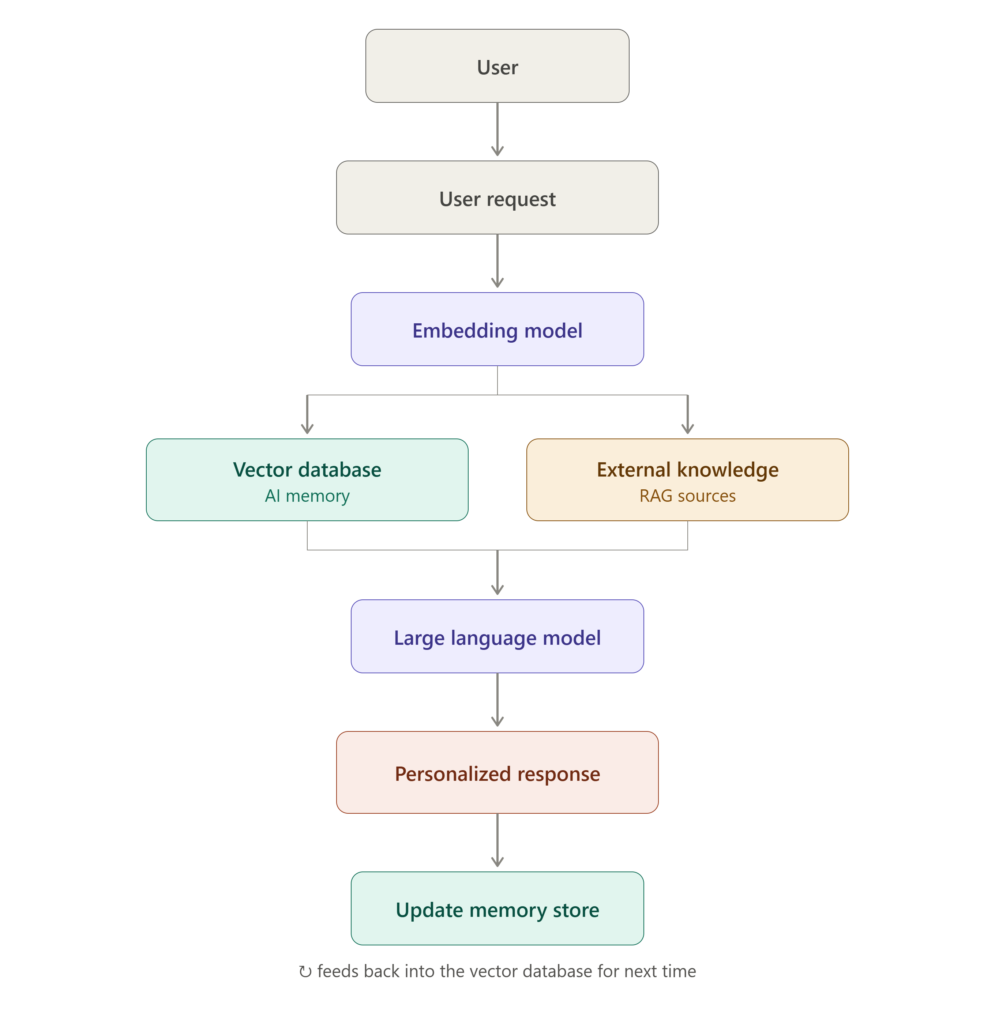
When a new request arrives, the system:
- Converts the user’s query into an embedding.
- Searches the vector database.
- Finds the most relevant memories.
- Sends those memories to the LLM.
Instead of reading every stored memory, the AI only retrieves information related to the current task.
This keeps responses both accurate and efficient.
5. Memory Updating
People change their preferences over time, so AI memories can’t remain static.
Developers design memory systems that continuously update stored information.
For example:
Old memory:
Preferred editor: VS Code
Later, the user says:
I recently switched to Cursor.
The AI updates the stored preference instead of keeping outdated information.
Many production systems also remove obsolete or rarely used memories to improve retrieval speed and reduce storage costs.
6. AI Frameworks for Memory
Building an AI memory system from scratch is possible, but most developers use specialized frameworks that handle memory management and agent workflows.
Some of the most popular frameworks include:
LangChain
LangChain provides ready-made components for:
- Conversation memory
- Tool calling
- Prompt management
- Document retrieval
- Agent workflows
It simplifies building AI applications that require persistent memory.
LangGraph
LangGraph is designed for creating stateful AI agents.
Unlike simple chatbots, stateful agents can:
- Track progress across multiple steps
- Maintain conversation state
- Coordinate multiple AI agents
- Manage complex workflows
It is especially useful for autonomous AI systems.
Redis
Redis has become a popular choice for AI memory because it combines several capabilities in one platform.
Developers use Redis for:
- Session storage
- Short-term memory
- Vector search
- Caching
- Fast data retrieval
Its low latency makes it ideal for real-time AI applications.
7. Retrieval-Augmented Generation (RAG)
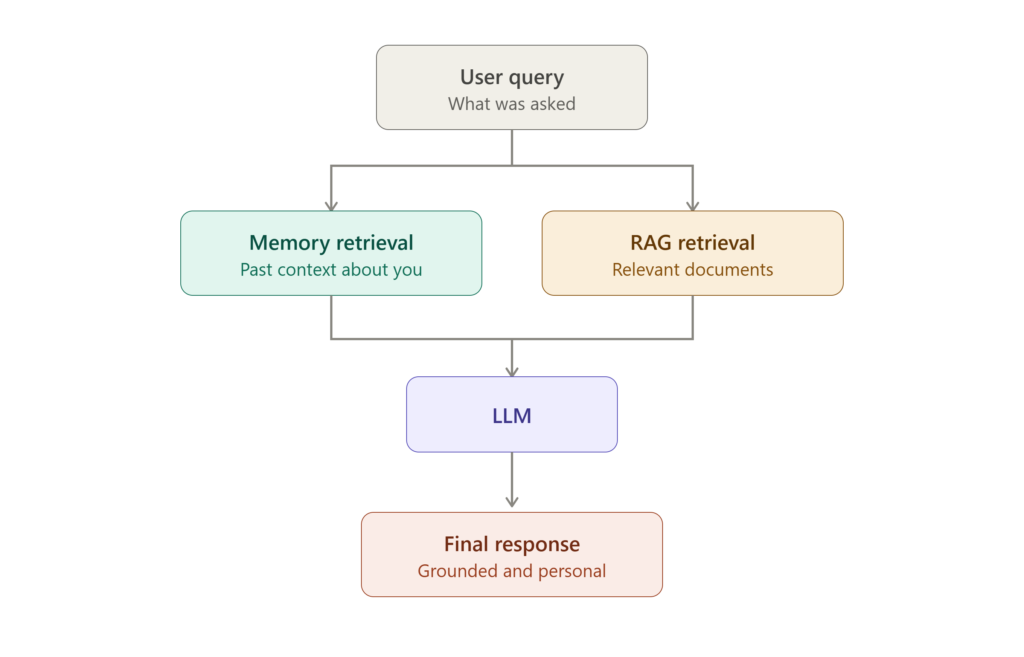
Many developers combine AI agent memory with Retrieval-Augmented Generation (RAG).
Here’s how they work together:
- Memory stores information about the user and previous interactions.
- RAG retrieves external knowledge from documents, databases, or websites.
For example, imagine an AI customer support agent.
Before responding, it can:
- Retrieve the customer’s previous support history using memory.
- Fetch the latest product documentation using RAG.
The AI then combines both sources to generate a personalized and accurate response.
This combination is widely used in enterprise AI applications because it delivers both personalization and factual accuracy.
A modern AI agent memory system typically follows this workflow:
Real-World Examples of AI Agents Using Memory
Memory is the difference between an AI agent that feels like a tool and one that feels like it actually knows you. Here’s how memory shows up in products people use every day

1. ChatGPT’s two-layer memory system
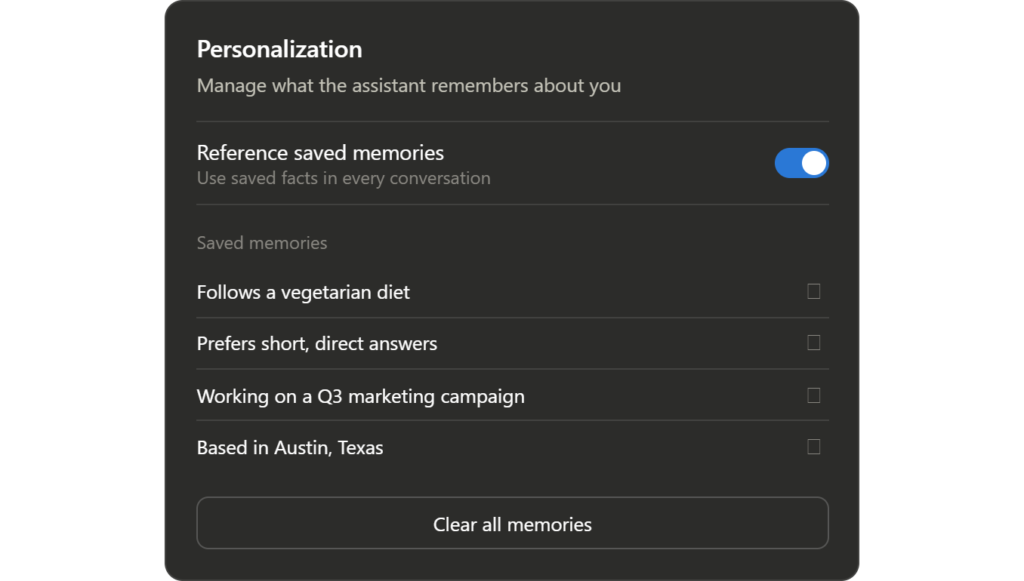
<cite index=”3-1″>ChatGPT’s memory runs on two separate systems that can be managed independently: saved memories, which are specific facts stored because the user asked ChatGPT to remember them or because ChatGPT detected something worth keeping, and chat history reference, which draws insights from past conversations.</cite> <cite index=”7-1″>As of mid-2026, that memory is generated by a background synthesis process OpenAI calls “Dreaming,” with Dreaming V3 rolling out on June 4, 2026, reading across many past chats asynchronously and injecting a synthesized memory state into each new conversation.</cite> <cite index=”7-1″>OpenAI has reported factual recall improving from roughly 67.9% to 82.8% in its own internal evaluations.</cite>
Practical example: a freelance writer sets their tone preferences once, and every future blog draft — months later — automatically matches that voice without a repeated prompt.
2. Claude’s account-wide memory
<cite index=”4-1″>Since March 2, 2026, memory has been available to everyone on Claude, including the free plan.</cite> <cite index=”4-1″>Unlike ChatGPT, where deleting a chat does not remove the facts remembered from it, Claude works the other way: deleting a conversation also removes the remembered points derived from it.</cite>
Practical example: a product manager runs recurring weekly planning chats in Claude; deleting an old, sensitive planning thread also clears whatever Claude inferred from it — a cleaner privacy model for people who don’t want stray facts lingering indefinitely.
3. AI coding assistants that remember your codebase
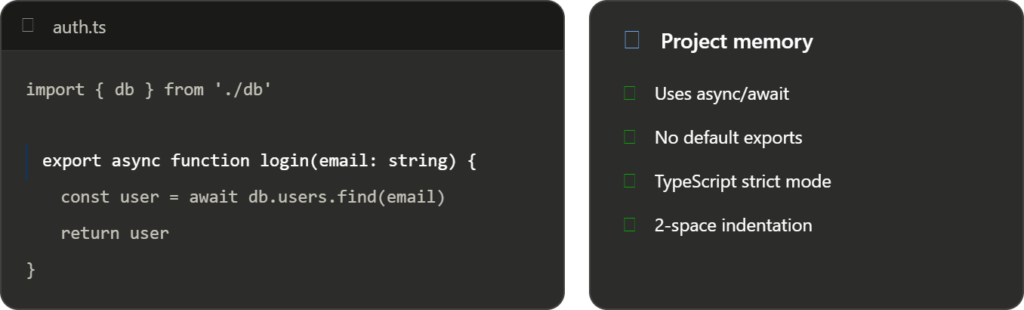
<cite index=”9-1″>Cursor’s memory features let it remember past interactions and maintain context across longer coding sessions.</cite> A competing tool, Windsurf, goes further on the “learn the project” side: <cite index=”12-1″>it autonomously analyzes a codebase over roughly 48 hours, learning architecture, naming conventions, libraries, and coding style, and that context persists across sessions.</cite>
Practical example: instead of re-explaining “we use async/await and never default exports” every session, a developer’s coding agent already applies house style automatically on the first suggestion of the day.
4. Customer support agents that remember the ticket history
Support AI agents increasingly pull from a customer’s full interaction history — past tickets, purchase records, previous troubleshooting steps — instead of starting cold on every chat. This is usually a blend of the memory and RAG patterns covered earlier in this post: memory holds “who this customer is,” while retrieval pulls in the specific order or account record needed for the current issue.
Practical example: a customer who reported a shipping delay last week doesn’t have to repeat the order number — the agent already has it and jumps straight to a status update.
5. Personal and voice assistants remembering routines
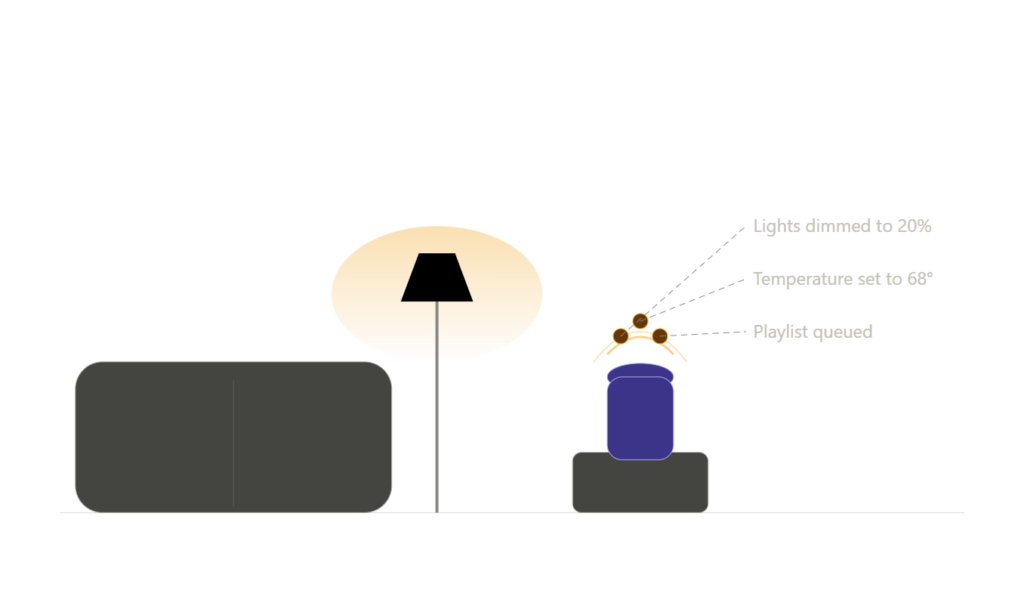
Voice assistants that manage smart-home routines, reminders, and calendars rely on a simpler but no less important form of memory: standing preferences (“keep the lights at 20% after 9pm”) and recurring patterns (weekday alarm times) that don’t need to be re-taught.
Practical example: a household sets a “movie night” routine once; the assistant remembers which lights, thermostat setting, and speaker volume that routine implies, every time it’s triggered by voice.
Frequently asked questions
What is AI agent memory? AI agent memory is the ability of an AI system to store information from past interactions and use it to inform future responses, instead of treating every conversation as a blank slate.
Is AI agent memory the same as RAG (retrieval-augmented generation)? No, though they’re often used together. Memory typically stores facts about the user or agent’s own history, while RAG retrieves relevant external documents or knowledge at query time. Many production agents run both in parallel and merge the results before generating a response.
Is stored AI memory private and secure? It depends on the provider and settings. <cite index=”5-1″>OpenAI has said ChatGPT is trained not to proactively remember sensitive information like health details unless explicitly asked, and deleted memories are removed from its systems within roughly 30 days rather than instantly.</cite> Users should always check a given provider’s memory and data-retention settings rather than assume a default.
Can I turn AI memory off? Most major assistants offer this. <cite index=”6-1″>ChatGPT lets users toggle saved memories and chat history reference independently in settings, and a temporary or incognito-style chat mode bypasses both.</cite>
Does AI memory get things wrong? Yes — this is one of the most common complaints. <cite index=”3-1″>A memory saved months ago can keep influencing responses long after it’s outdated, so providers generally recommend periodically reviewing and pruning stored memories.</cite>
Final thoughts
AI agent memory is quickly moving from a novelty to a baseline expectation. The agents that feel genuinely useful in 2026 aren’t the ones with the biggest models — they’re the ones that remember enough to save you time, without remembering so much (or so inaccurately) that it becomes a liability. If you’re building or choosing an AI agent, the questions worth asking are simple: What does it store? How long does it keep it? Can you see it, edit it, and delete it? Get those answers right, and memory becomes a genuine productivity multiplier rather than a privacy risk.
External resources
- OpenAI — Memory and new controls for ChatGPT
- Anthropic — Claude documentation