Local open source AI models are AI models whose weights are available for download and can be run on your own hardware or private infrastructure.
There is an important distinction, though.
“Open source” and “open weight” are not always the same thing. Some companies release model weights while keeping parts of the training data, training process, or surrounding infrastructure closed.
Why Run AI Models Locally?
The biggest reason is control.
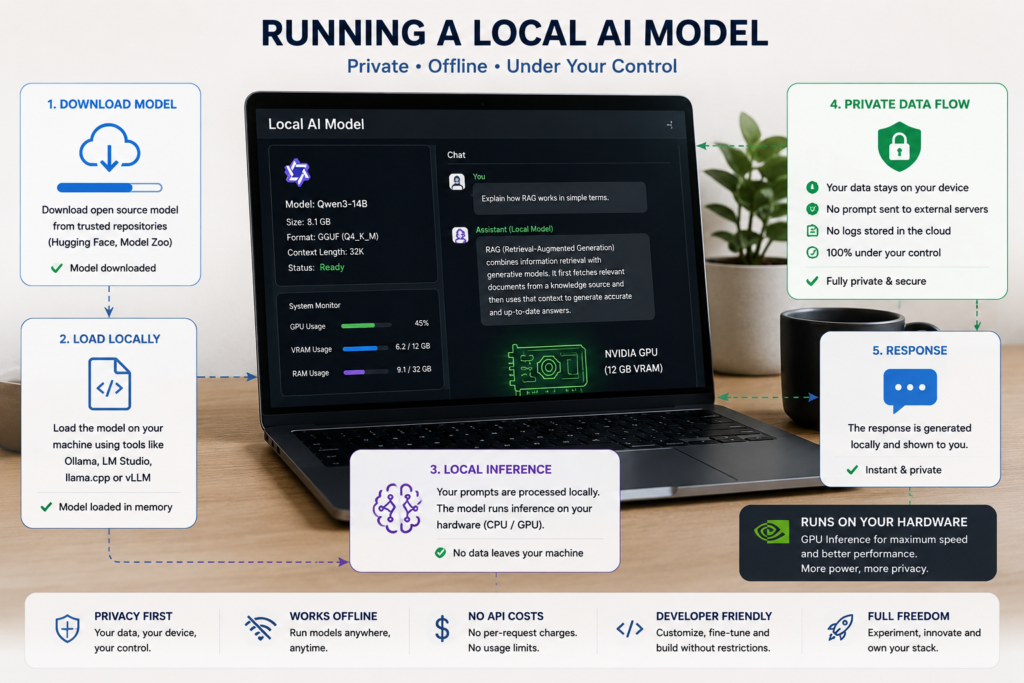
When an AI model runs locally, your prompts and documents can remain on your machine instead of being sent to an external API.
Local AI models are particularly useful for:
- Private document processing
- Coding assistants
- Offline AI applications
- Prototyping
- Research and experimentation
- Custom AI assistants
- Local RAG systems
- AI agents
- Developers who want to avoid API costs during testing
There is also a practical advantage that you aren’t completely dependent on an internet connection or a provider’s API limits.
The trade-off is that you become responsible for the hardware, performance, updates, storage, and deployment.
Best Local Open Source AI Models in 2026
A small model may be perfect for a laptop but unsuitable for a large production workload. A huge reasoning model may be extremely capable but completely impractical on a normal PC.
Here are the model families worth knowing.
1. Qwen3
Qwen3 is one of the strongest choices for developers looking for a versatile local model.
The Qwen3 family includes dense and mixture-of-experts models and supports reasoning, coding, instruction following, agent workflows, and multilingual use. The Qwen3-235B-A22B model, for example, has 235 billion total parameters with 22 billion activated parameters and is released under Apache 2.0.
That doesn’t mean the 235B model belongs on your laptop. It is a large model.
The real advantage of Qwen3 is the range of model sizes, allowing developers to choose a model based on available hardware.
Best for: coding, reasoning, multilingual applications, AI agents, and general-purpose local AI.
2. Llama 4
Meta’s Llama family remains one of the most important ecosystems in local AI.
Llama 4 introduced Scout and Maverick, open-weight multimodal models built using mixture-of-experts architectures. Meta designed the models for multimodal applications and large-context workloads.
3. Gemma 4
Google’s Gemma family is designed to bring capable AI models to more accessible hardware.
Gemma 4 includes different model sizes and supports text and image input, while some variants also support audio. Google says Gemma 4 supports more than 140 languages and context windows up to 256K tokens.
4. Mistral Models
Mistral has built a strong reputation around efficient open models.
Its current lineup includes models such as Mistral Large 3, Mistral Small 4, and the smaller Ministral family. Mistral describes several of these as open or open-weight models, with many released under Apache 2.0.
5. DeepSeek
DeepSeek became especially well known for its reasoning models.
DeepSeek-R1 was released with model weights and code under an MIT license, and the company also released smaller distilled models based on R1.
That makes the DeepSeek ecosystem particularly interesting for developers experimenting with reasoning and local inference.
6. gpt-oss
OpenAI’s gpt-oss models are another important addition to the local AI ecosystem.
OpenAI released gpt-oss-20b and gpt-oss-120b as open-weight reasoning models under Apache 2.0. They are designed to run on infrastructure controlled by the developer rather than through ChatGPT or the OpenAI API.
The smaller gpt-oss-20b model is particularly interesting for local deployment because OpenAI states that it can run with around 16 GB of memory, while gpt-oss-120b is designed for substantially larger hardware.
Which Local AI Model Should You Choose?
Don’t choose a model simply because someone calls it “the best.”
Choose it based on your hardware and your workload.
This isn’t a benchmark ranking. Model performance changes quickly, and the best choice depends heavily on the specific task and model size.
How Much Hardware Do You Need?
A model’s parameter count doesn’t directly tell you exactly how fast it will run on your machine. Quantization, context length, GPU memory, CPU performance, and the inference engine all matter.
As a rough starting point:
Small models: suitable for many laptops and consumer PCs.
Medium models: generally benefit from a dedicated GPU or substantial unified memory.
Large models: often require high-memory GPUs or multiple GPUs.
How to Run Local Open Source AI Models
You don’t need to build an inference engine from scratch.
Several tools make local AI much easier.
Ollama
Ollama is one of the simplest ways to get started with local models.
It provides a command-line interface for downloading and running models locally and can also be used as a local API for applications. Hugging Face’s documentation lists Ollama among the tools available for running models locally.
For beginners, this is often the easiest starting point.
LM Studio
If you prefer a graphical interface, LM Studio is a convenient option.
It lets you download and experiment with local models without requiring everything to happen through the terminal. Hugging Face documents LM Studio as a desktop application for running and experimenting with local AI models on Windows, macOS, and Linux.
llama.cpp
llama.cpp is popular when developers want more control over local inference, especially with GGUF models and CPU or Apple Silicon environments.
It is more technical than a beginner-friendly GUI, but it gives you considerably more control.
vLLM
For developers moving from experimentation toward serious self-hosted inference, vLLM is worth learning.
It is an open-source inference and serving engine designed for efficient LLM serving and can expose an OpenAI-compatible API. Mistral recommends vLLM for self-deploying its models.
Are Local AI Models Worth Learning in 2026?
Yes—especially if you’re a developer.
The local AI ecosystem is becoming an important part of AI engineering because developers can experiment with models without building everything around a third-party API.
In other words, running local open source AI models isn’t only about saving API costs.
It is also a practical way to understand how modern AI systems actually work.
Final Thoughts
The best local open source AI models aren’t necessarily the biggest models.
The right model is the one that gives you the balance of quality, speed, hardware requirements, license, privacy, and ease of deployment that your project needs.
For beginners, start with a smaller Qwen, Gemma, Mistral, or gpt-oss model through Ollama or LM Studio. Once you understand local inference, move toward quantization, RAG, tool calling, and eventually self-hosted serving with tools such as vLLM.
Local AI is no longer just a hobbyist experiment. In 2026, it is becoming a practical option for developers who want more control over how and where their AI applications run.
External Resources
- OpenAI gpt-oss
- Meta Llama
- Google Gemma
- Mistral Models
- Qwen3 on Hugging Face
- DeepSeek-R1
- Hugging Face Local Apps
FAQs
What are the best local open source AI models in 2026?
Qwen3, Llama 4, Gemma 4, Mistral’s open models, DeepSeek, and OpenAI’s gpt-oss are among the major model families worth considering. The best choice depends on hardware and use case.
Can I run AI models locally without a GPU?
Yes. Smaller and quantized models can run on CPUs, although inference is generally slower than GPU-based inference.
What is the easiest way to run a local AI model?
Ollama is one of the easiest starting points for developers, while LM Studio is a good option if you prefer a graphical interface.
Are local AI models completely private?
They can be, because inference can happen entirely on your own hardware. However, privacy also depends on the software, integrations, logging, telemetry, and external services you connect to the model.
What is the difference between open source and open-weight AI models?
Open-weight models make trained model weights available, but that does not necessarily mean every part of the model’s training data, code, or development process is openly available. Always check the individual model’s license and documentation.
Are Local Open Source AI Models Free?
The model weights may be available at no charge, but running the model isn’t necessarily free.
How to Run Local AI Models?
Install Ollama → Download Model → Run Model → Chat Locally
You can mention tools such as Ollama, LM Studio, and llama.cpp.