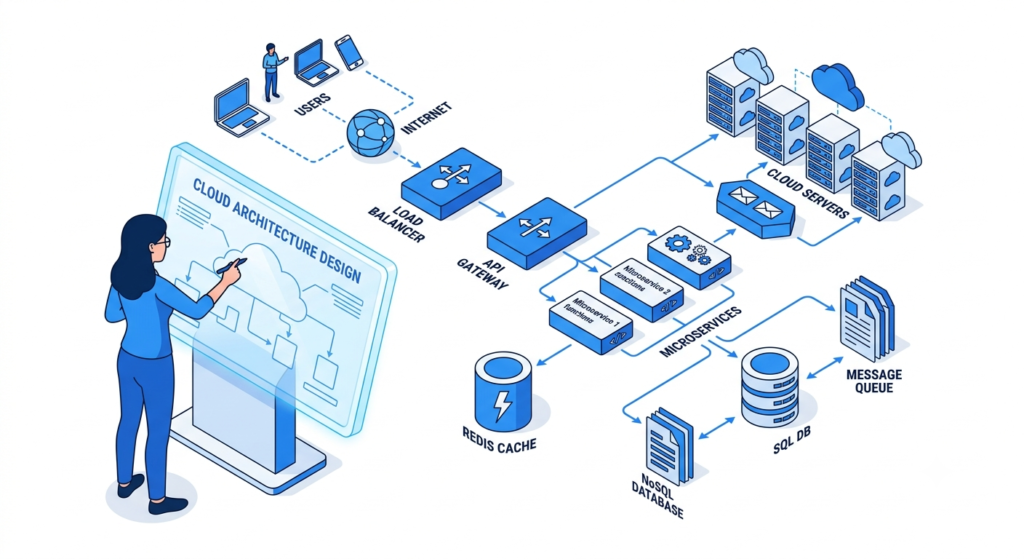
System design cheat sheet covering the core concepts, architecture patterns, and scalability techniques you need to understand modern software systems. This guide brings together the most important system design basics, from load balancing and caching to databases, message queues, replication, and sharding.
1. What Is System Design?
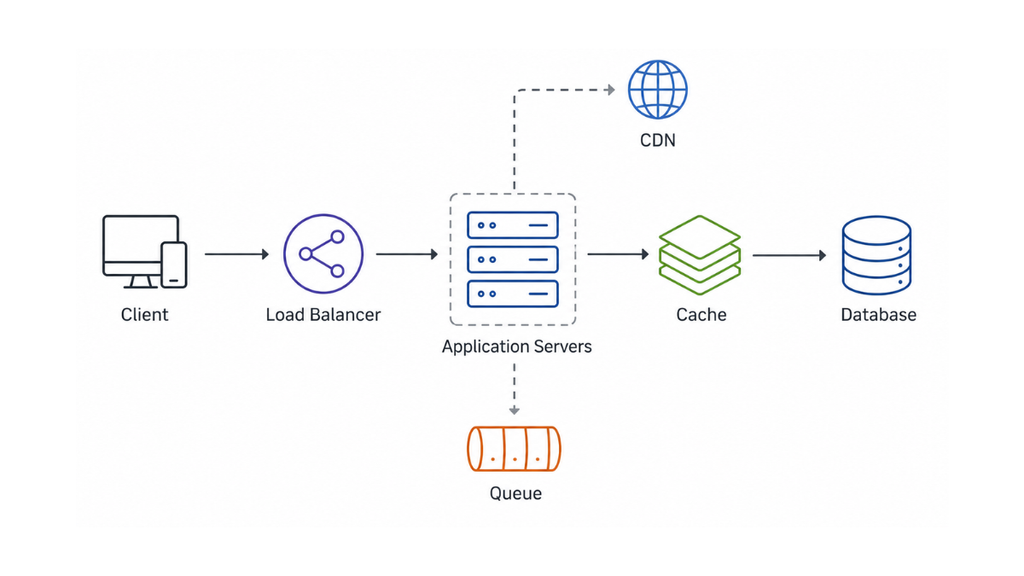
System design is the process of deciding how different software components work together to satisfy functional and non-functional requirements.
A system can contain:
- Clients
- APIs
- Application servers
- Databases
- Caches
- Load balancers
- CDNs
- Storage systems
The goal isn’t simply to add more components.
The goal is to build a system that can handle its expected workload while meeting requirements such as:
- Scalability
- Availability
- Reliability
- Performance
- Security
In a system design interview, there usually isn’t one universally correct architecture. The important part is being able to explain why you selected a particular design and what trade-offs it introduces.
2. System Design Basics: Functional vs Non-Functional Requirements
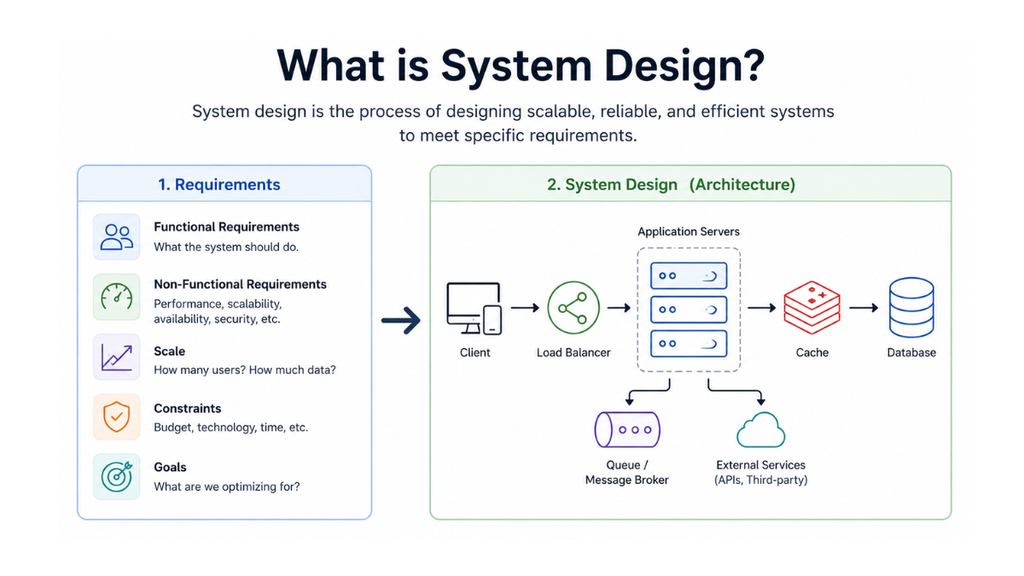
Before drawing architecture, separate the requirements into two categories.
Functional Requirements
These describe what the system should do.
For example, a URL-shortening service may need to:
- Accept a long URL.
- Generate a short URL.
Non-Functional Requirements
These describe how the system should behave.
Examples include:
- High availability
- Data consistency
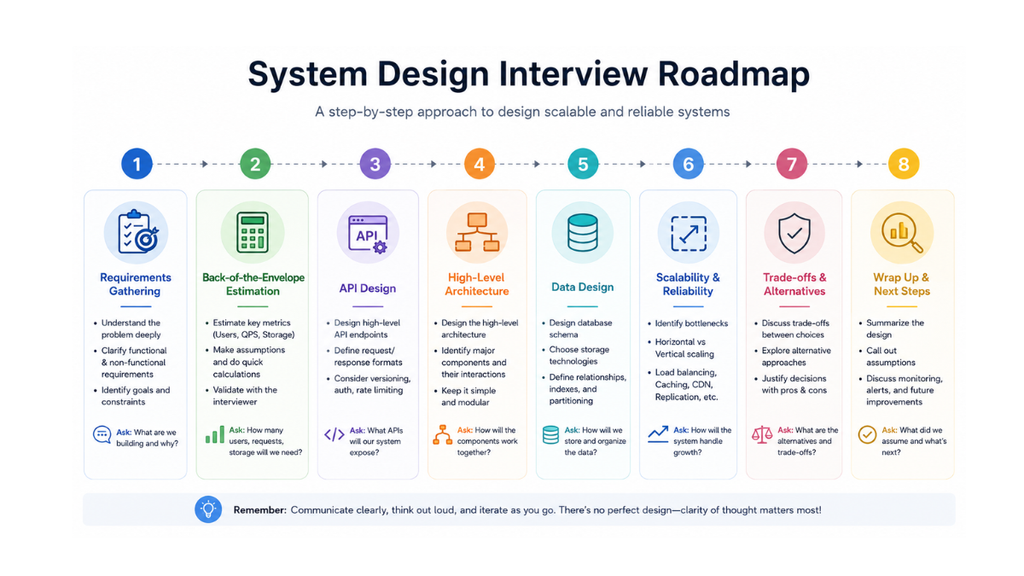
3. The System Design Interview Framework
A repeatable process makes system design interview preparation much easier.
Instead of immediately drawing databases and microservices, follow this sequence:
Step 1: Clarify Requirements
Ask what the system needs to support and what is outside the scope.
Step 2: Estimate Scale
Estimate:
- Number of users
- Requests per second
- Storage requirements
Step 3: Define APIs
Identify the major operations the client needs.
Step 4: Create the High-Level Architecture
Connect the major components and show the data flow.
Step 5: Design Data Storage
Choose the appropriate database and define the important entities and access patterns.
Step 6: Identify Bottlenecks
Look for areas that could become problematic as traffic grows.
Step 8: Discuss Trade-Offs
Explain why you selected one approach over another.
This framework is useful because it keeps the discussion structured instead of turning the interview into random architecture decisions.
4. Capacity Estimation
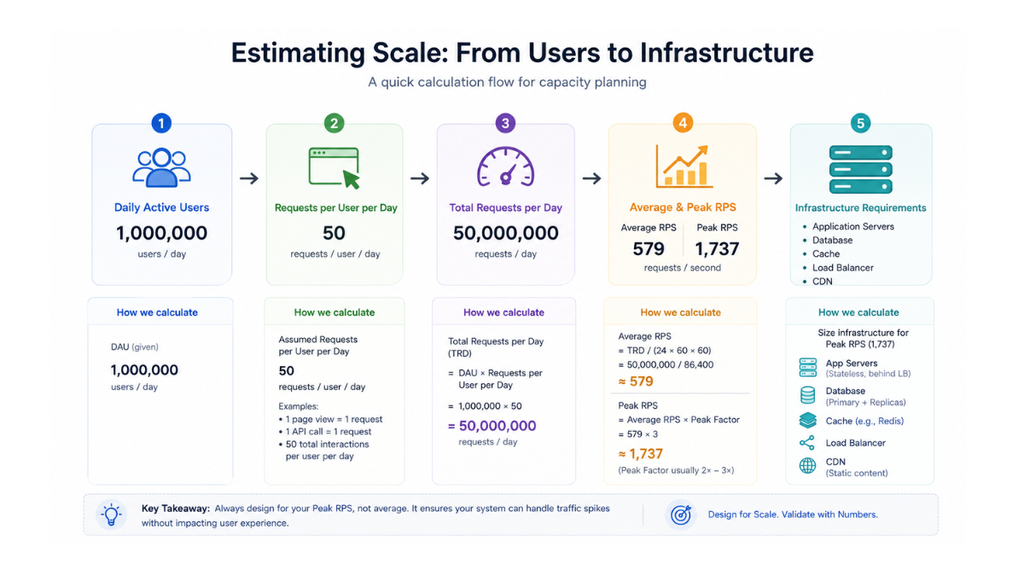
Capacity estimation connects the requirements to the architecture.
Capacity estimation can help determine whether you need:
- One application server
- Multiple servers
- A cache
- Database replicas
- Message queues
5. Horizontal vs Vertical Scaling
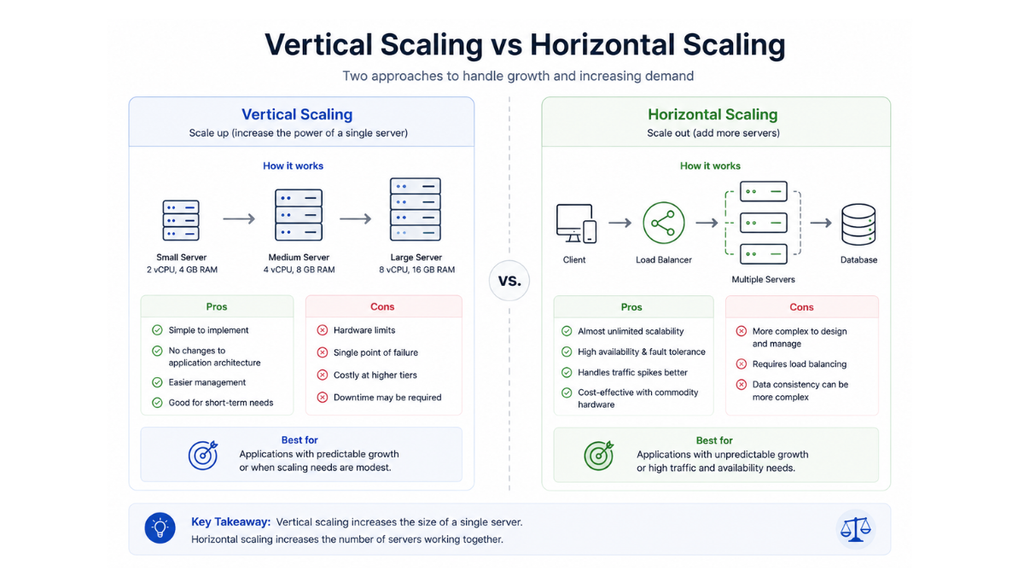
Scaling means increasing the capacity of a system.
There are two fundamental approaches.
Vertical Scaling
Vertical scaling means increasing the resources of an existing machine.
Advantages:
- Simple
- Easy to implement
Horizontal Scaling
Horizontal scaling means adding more machines.
Instead of making one server extremely powerful, you distribute requests across multiple servers.
This approach is especially useful for applications that need to handle growing traffic.
6. Load Balancer
A load balancer distributes incoming requests across multiple application servers.
This provides two major benefits:
- Traffic distribution
- Higher availability
If one application server becomes unhealthy, the load balancer can stop sending traffic to it.
Load balancing is one of the most common components in scalable system architectures.
7. Caching
Caching stores frequently accessed data in a faster storage layer.
Instead of repeatedly querying the database, the application first checks the cache. The requested data exists in the cache.
Caching can reduce database load and improve response times, particularly for read-heavy workloads.
8. Common Cache Strategies
Cache-Aside
The application manages the cache.
This is a common approach because the application controls when data is read into or removed from the cache.
Read-Through Cache
The application communicates with the cache, while the cache handles fetching missing data from the underlying data store.
Write-Through Cache
A write updates the cache and the database as part of the write operation.
Write-Behind Cache
The cache receives the write first and database persistence happens asynchronously.
Each strategy introduces different trade-offs involving consistency, performance, and implementation complexity.
9. Database Selection
Choosing a database should depend on the application’s requirements and access patterns.
The two broad categories you’ll encounter frequently are:
- SQL databases
- NoSQL databases
SQL Databases
Examples include:
- PostgreSQL
- MySQL
- SQL Server
SQL databases are useful when you need:
- Structured schemas
- Relationships between entities
- Transactions
- Strong consistency requirements
NoSQL Databases
Common categories include:
- Key-value
- Document
- Wide-column
- Graph
NoSQL systems can be useful when applications require flexible data models or large-scale distributed workloads.
The important system design principle is:
Choose the database based on the workload, data model, and consistency requirements, not simply because a technology is popular.
10. Database Replication
Replication creates multiple copies of database data.
The primary database handles writes while replicas can handle read operations, depending on the consistency model and architecture.That creates an important system design trade-off between consistency, availability, performance, and complexity.
11. Database Sharding
Replication creates copies.
Sharding splits data.
Instead of storing the entire dataset on one database server, data is distributed across multiple database instances.
A sharding key determines where a particular record is stored.
Feature Replication Sharding Main purpose Create copies Split data Improves read scaling Yes Potentially Distributes dataset No Yes Helps availability Yes Depends on architecture Complexity Moderate Higher Typical use Read-heavy systems Very large datasets
12. Rate Limiting
Rate limiting controls how many requests a client can make during a specific period.
If a user exceeds the limit, additional requests can be rejected or delayed.
13. Consistency Models
Different applications can tolerate different levels of data freshness.
Strong Consistency
A read returns the latest successfully written value according to the system’s guarantee.
Useful when stale data could cause serious problems.
Eventual Consistency
Different replicas may temporarily contain different values, but they converge over time.
Useful when temporary staleness is acceptable.
14. System Design Components: When Should You Use What?
This is one of the most useful sections to keep as a quick-reference cheat sheet.
| Problem | Possible Solution |
|---|---|
| Too much traffic on one server | Load balancing |
| Need more application capacity | Horizontal scaling |
| Static content is slow globally | CDN |
| Database receives too many repeated reads | Cache |
| Database reads need scaling | Read replicas |
| Dataset is too large for one database | Sharding |
| Background work blocks requests | Message queue |
| API is being abused | Rate limiting |
| Multiple backend services need centralized routing | API gateway |
| Need fast text search | Search engine |
| Large files need storage | Object storage |
| Service failures cause cascading problems | Timeouts/circuit breakers |
| Need to understand production failures | Observability |
| Temporary stale data is acceptable | Eventual consistency |
| Strong data guarantees are required | Stronger consistency model |
15. System Design Interview Cheat Sheet
When you’re sitting in a system design interview, don’t immediately start drawing technologies.
Use this checklist.
Requirements
- What are the core features?
- Who are the users?
- What is out of scope?
- What are the important non-functional requirements?
Scale
- How many users?
- How many requests per second?
- What is the read/write ratio?
- How much data is generated?
- What is the expected peak traffic?
API
- What are the major endpoints?
- What does each request contain?
- What does each response return?
Architecture
- Do we need a load balancer?
- Do we need caching?
- Do we need a CDN?
- Do we need asynchronous processing?
Database
- SQL or NoSQL?
- What is the data model?
- Which fields need indexes?
- Do we need replication?
- Do we need sharding?
Reliability
- What happens if a server fails?
- What happens if the database fails?
- What happens if the cache fails?
- How are retries handled?
Scaling
- What becomes the bottleneck at 10× traffic?
- Can the application scale horizontally?
- Can the database handle the workload?
- Where should caching or asynchronous processing be introduced?
Trade-Offs
- Why did you choose this database?
- Why use a queue?
- Why cache this data?
- What consistency level is required?
- What are the limitations of your design?
These questions keep your answer focused and help demonstrate structured reasoning rather than memorized architecture diagrams.
16. Common System Design Interview Problems
Once you understand the fundamental building blocks, practice applying them to different systems.
Common problems include:
1- URL Shortener
2- Chat System
3- File Storage System
17. System Design Interview Preparation Strategy
You don’t need to memorize dozens of complete architectures.
Instead, build your preparation around concepts + patterns + practice.
Phase 1: Learn the Fundamentals
Phase 2: Learn Scaling Patterns
Phase 3: Practice System Design Problems
Final Takeaway
System design is less about memorizing architectures and more about understanding how systems behave under scale, failure, and changing requirements.
Start with requirements. Estimate the workload. Design the simplest architecture that can satisfy those requirements. Then introduce caching, load balancing, queues, replication, sharding, or other components when the workload actually demands them.
For system design interview prep, use this cheat sheet as a revision reference, but don’t stop at reading. Take one problem at a time and practice moving from requirements to architecture, then explain the trade-offs behind every major decision.