AI Agent Integration: How to Connect Agents With Data, APIs, and Business Systems
AI agents become far more useful when they can do more than generate text. AI agent integration connects agents with the data, applications, APIs, and tools they need to understand situations and take action.
Instead of working inside an isolated chatbot, an integrated agent can retrieve customer records, check inventory, update a CRM, create tickets, query databases, or trigger business workflows. This turns AI agents from conversational interfaces into systems that can participate in real operations.
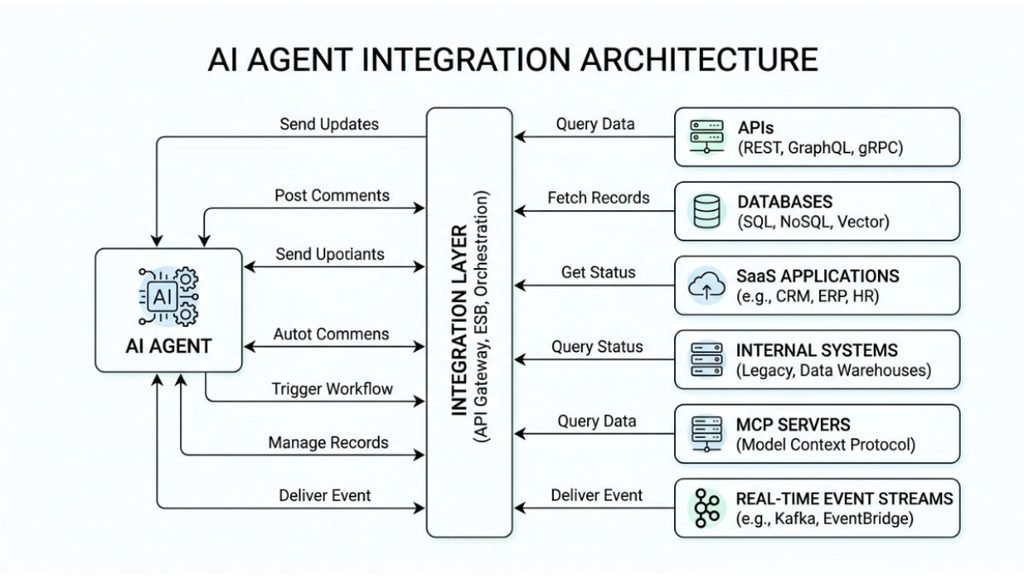
The integration layer is what makes that possible. It connects an agent’s reasoning capabilities with external systems, external data sources, and controlled action interfaces while managing authentication, permissions, errors, and observability.
What Is AI Agent Integration?
Understanding AI Agent Integrations
AI agent integration is the process of connecting an AI agent to external systems so it can access information, use tools, and perform authorized actions.
A basic agent may only receive a prompt and return an answer. An integrated agent can retrieve live information, reason over it, and then call an API or another tool to complete a task.
For example, a sales agent could receive a request such as, “Find customers whose contracts expire this month.” It could query a CRM, retrieve account information, summarize the results, and create follow-up tasks.
This involves several integration points, including APIs, databases, SaaS platforms, file systems, event streams, and specialized tools.
Integration Is More Than Data Access
A useful integration does not simply give an agent more information. It gives the agent controlled capabilities.
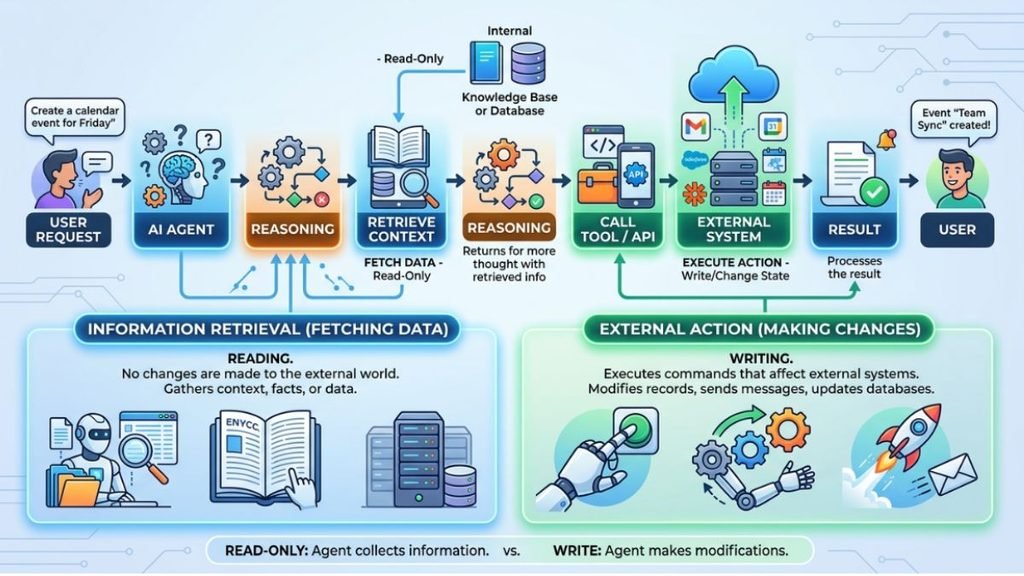
Data integration helps an agent retrieve context. Action integration allows it to change something in an external system. Together, these capabilities support workflows where an agent can observe, reason, act, and verify the result.
Why Do AI Agents Need Integration?
Turning Reasoning Into Action
An agent without integrations can explain how to complete a task but may not be able to complete it.
Consider an IT support agent. It can explain why a user might have an access problem, but integration with an identity platform could let it check account status, create a ticket, or initiate an approved workflow.
This is where autonomous action becomes practical. The agent can use external capabilities instead of relying entirely on human operators.
Giving Agents Real-Time Context
Static knowledge becomes less useful when information changes frequently. Integrated agents can retrieve real-time context from operational systems before responding.
For example, an inventory agent should not rely on yesterday’s product count. It should query the current inventory system before confirming availability.
The same principle applies to CRM records, financial systems, project management tools, support platforms, and internal databases.
Supporting Retrieval and Decision-Making
Integration also strengthens RAG pipelines and retrieval-augmented generation by connecting agents to trusted enterprise information.
The agent can retrieve relevant structured or unstructured data, evaluate the context, and then use an appropriate tool to continue the workflow.
What Systems and Data Sources Can AI Agents Connect To?
Business Applications
Agents can connect to third-party SaaS applications such as CRM, help desk, project management, ERP, marketing, collaboration, and accounting platforms.
These connections usually rely on APIs, SDKs, webhooks, or specialized connectors.
For example, an AI sales agent might combine CRM records, email activity, calendar information, and product data before preparing a customer briefing.
Databases and Enterprise Data
Agents can also connect to relational databases, document stores, data warehouses, knowledge bases, and internal repositories.
The important distinction is between structured data, unstructured data, and streaming data. Structured records may come from SQL databases, while unstructured information may include documents, emails, or support conversations.
APIs, Events, and Operational Systems
APIs provide direct interfaces for retrieving or changing information. Webhooks can notify an agent-enabled system when something happens.
An event-driven AI agent can respond to events such as a new support ticket, failed payment, inventory threshold, or security alert.
This creates a more responsive architecture than repeatedly asking an agent to poll every system.
MCP Servers and Connected Tools
The Model Context Protocol (MCP) provides a standardized way for applications to expose tools and context to AI models. Current MCP documentation also covers authorization, remote servers, tool discovery, and scalable deployments.
For example, an agent can connect to an MCP server that exposes approved functions for a database, documentation system, or business application.
The OpenAI Agents SDK similarly supports MCP servers alongside ordinary function tools, allowing agents to use remote or locally managed MCP capabilities.
What Are the Main Approaches to AI Agent Integration?
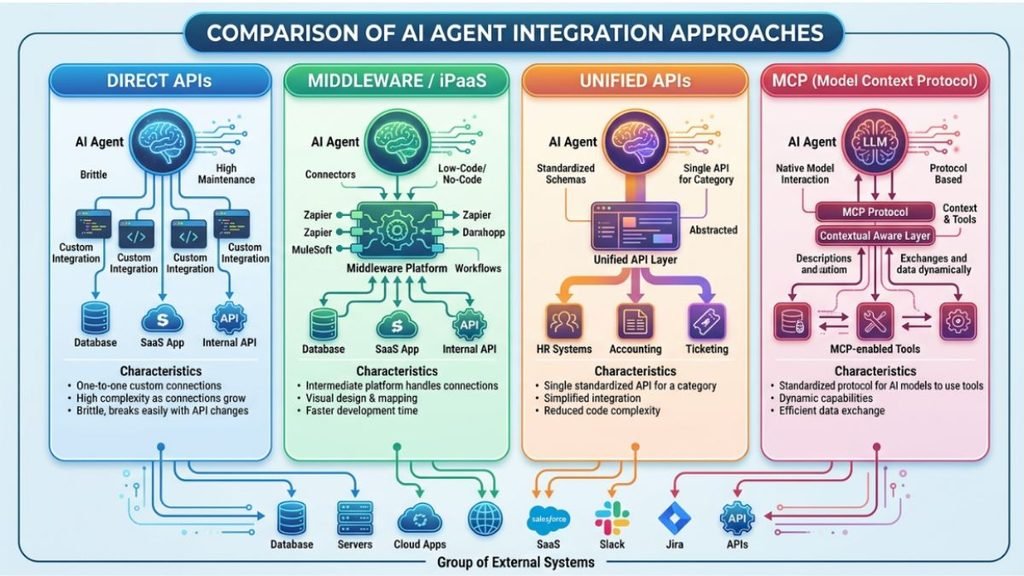
Direct API Integration
The simplest approach is often a direct API connection. Developers create functions that translate agent requests into API calls.
This provides precise control over authentication, schemas, error handling, and permissions.
However, direct connections become harder to maintain as the number of integrations grows. Each application may have different authentication requirements, data models, rate limits, and API versions.
Middleware and iPaaS
AI agent integration middleware can provide a shared layer between agents and business systems.
An iPaaS or integration platform can handle data transformation, authentication, routing, retries, and connector management.
This approach can reduce repeated integration work when many agents need access to the same systems.
Unified APIs
A unified API provides one interface for multiple services that perform similar functions.
For example, instead of building separate integrations for many CRM systems, a unified API platform can normalize their interfaces into a common model.
This can simplify data normalization, but developers still need to understand differences between underlying providers.
MCP-Based Integration
MCP provides another integration model by standardizing how AI applications discover and use tools and context.
The key advantage is interoperability. An agent can work with an MCP server without requiring every application to invent a completely different tool interface.
How to Integrate AI Agents Into Existing Systems
Step 1: Identify the Business Workflow
Start with the workflow rather than the technology.
Choose a task where the agent can provide measurable value. Define what information it needs, which decisions it can make, and which actions require approval.
This prevents teams from creating integrations simply because an API is available.
Step 2: Map Data and Action Requirements
Create an integration map showing every required data source and action.
For each system, document the API, authentication method, available operations, data schema, rate limits, error behavior, and ownership.
This becomes the foundation of the integration architecture.
Step 3: Build Controlled Tool Interfaces
Do not expose an entire application to an agent when it only needs three functions.
Create narrow tools such as get_customer, check_inventory, or create_ticket.
This improves security and makes tool behavior easier to test and monitor.
Step 4: Add Authentication and Authorization
Every integration should establish agent identity and define what that identity can access.
Use appropriate IAM, authorization policies, scoped credentials, and least-privilege permissions.
Step 5: Test Before Autonomous Execution
Start with read-only operations whenever possible.
Then introduce controlled write actions with validation, approval requirements, rollback strategies, and automated testing.
This staged approach makes it easier to identify hallucinations, malformed requests, permission problems, and unexpected tool behavior.
Step 6: Monitor the Integration
Production systems need monitoring, tracing, logs, and observability.
Track tool calls, failures, latency, authentication errors, API usage, and important business outcomes.
An AgentOps layer can then connect technical telemetry with agent behavior and workflow performance.
How APIs, Webhooks, MCP, and Unified APIs Connect AI Agents
APIs
APIs are the foundation of many AI agents integration architectures.
They allow agents to retrieve information or execute specific operations through defined interfaces.
REST, GraphQL, and other API styles can all work, provided the agent-facing tool clearly defines inputs, outputs, permissions, and failure behavior.
Webhooks
Webhooks work in the opposite direction. Instead of an agent repeatedly requesting information, an external system sends an event when something changes.
For example, a payment platform can send a webhook after a payment fails. That event can trigger an agent workflow that investigates the account and prepares an appropriate response.
MCP
MCP standardizes how applications expose tools and context to AI systems.
The current MCP specification includes authorization improvements and a stateless protocol core designed to improve scalability for remote deployments.
Unified APIs
Unified API platforms reduce the number of provider-specific interfaces an agent needs to understand.
They are especially useful when organizations integrate many applications with similar functions.
However, normalization can hide provider-specific capabilities. Teams should confirm that the unified abstraction supports the actions their agents actually need.
How to Secure AI Agent Integrations
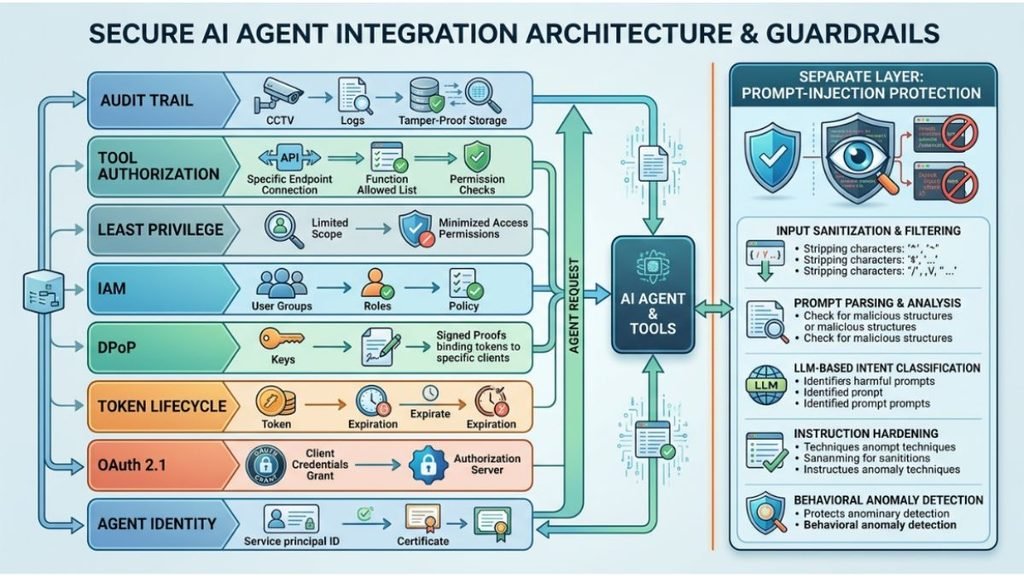
OAuth 2.1 and Token Management
Security starts with identity and authorization.
OAuth 2.1 is currently an active IETF Internet-Draft rather than a finalized RFC, so implementations should track the current specification and their identity provider’s supported standards.
For agent systems, teams should define an AI agent token lifecycle covering issuance, storage, expiration, refresh, revocation, and rotation.
Tokens should provide only the permissions required for the specific task.
DPoP and Sender-Constrained Tokens
DPoP can sender-constrain OAuth access and refresh tokens by binding them to a public/private key pair.
This helps reduce the usefulness of a stolen token because the attacker also needs the corresponding private key to create valid proofs.
DPoP is defined by IETF RFC 9449 and should be treated as an additional security mechanism rather than a replacement for authorization or access control.
Fine-Grained Agent Access Management
An AI agent access management strategy should define exactly which agent can access which resource and which actions it can perform.
Use least privilege, scoped credentials, ACLs, IAM policies, and fine-grained authorization where appropriate.
For sensitive actions, require human approval instead of allowing unrestricted autonomous execution.
Protecting Against Prompt Injection
External data should never automatically become trusted instructions.
A malicious document, email, webpage, or database field could contain content designed to manipulate the agent.
Therefore, agentic AI security should separate untrusted data from trusted instructions and apply validation before allowing an agent to execute sensitive tools.
How Multi-Agent Orchestration Works With Integrated Systems
Coordinating Specialized Agents
A single agent does not always need to handle every task.
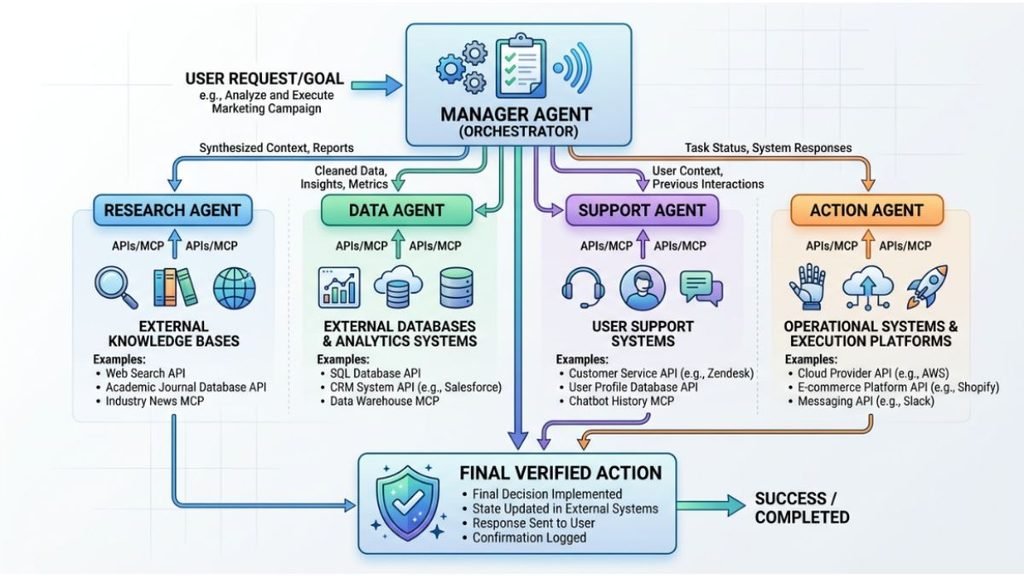
Multi-agent orchestration divides complex workflows among specialized agents. One agent might retrieve customer data, another might analyze it, and a third might prepare an action.
This creates AI agent task delegation and coordination across specialized capabilities.
Modern agent frameworks support patterns where agents can use tools, hand off work, or act as callable tools for other agents.
Manager-Based and Handoff Patterns
A manager agent can coordinate several specialists and decide which capability should run next.
Alternatively, agents can use explicit handoffs, where one specialist transfers responsibility to another.
Both approaches can work. The right design depends on workflow complexity, control requirements, latency, and how much decision-making should remain deterministic.
Event-Driven Multi-Agent Workflows
An event-driven AI agent architecture can trigger workflows from external events instead of direct user prompts.
For example:
New Support Ticket → Triage Agent → Knowledge Agent → Resolution Agent → CRM Update
This pattern combines workflow orchestration, APIs, events, and specialized agents.
What Are the Common Challenges of AI Agent Integration?
API Drift and Versioning
APIs change. Endpoints are deprecated, schemas evolve, and authentication requirements can shift.
API versioning and API drift can therefore break an agent even when its reasoning logic has not changed.
Integration teams need contract testing and regular compatibility checks.
Latency and Rate Limits
Every tool call adds latency.
An agent that makes six sequential API requests may feel much slower than one that retrieves the required information in a single optimized call.
Rate limits can create another bottleneck, especially when many agents run simultaneously.
Data Normalization
Different systems often represent the same concept differently.
One CRM may use customer_id, while another uses account_id. Dates, currencies, statuses, and field names may also vary.
A normalization layer can reduce this friction, particularly in large data integration platforms with AI agents.
Reliability and Error Handling
External systems fail. APIs timeout, credentials expire, network requests fail, and services return unexpected responses.
Agents need deterministic error handling rather than assuming every tool call succeeds.
Retries, timeouts, fallbacks, validation, and human escalation should be designed into the workflow.
Hallucinations and Unsafe Actions
An agent may select the wrong tool, construct invalid parameters, or misunderstand retrieved information.
The risk increases when the agent can modify real systems.
Tool schemas, validation, guardrails, approval steps, and audit trails can reduce the impact of these failures.
Build Versus Buy
Teams must also decide whether to build integrations internally or use middleware, connectors, unified APIs, or AI agent orchestration platforms.
Building offers control but increases maintenance. Buying can accelerate deployment but introduces vendor dependency and abstraction limits.
Best Practices for Successful AI Agent Integration
Design for Least Privilege
Give every agent only the tools and permissions it actually needs.
Avoid broad credentials that allow an agent to access unrelated systems or perform unrestricted actions.
Treat Integrations as Production Software
Use CI/CD, automated tests, version control, contract testing, monitoring, and rollback procedures.
An integration should be maintained like any other production dependency.
Keep Humans in the Loop for High-Risk Actions
Actions involving money, permissions, sensitive records, account deletion, or irreversible changes should receive appropriate approval.
Autonomy should increase gradually as reliability is demonstrated.
Build for Observability
Maintain audit trails for important agent decisions and tool calls.
Track latency, failures, API usage, authorization events, and business outcomes so teams can identify problems before they become systemic.
Measure Business Value
Finally, measure the ROI of the integration.
Track metrics such as task completion rate, time saved, error reduction, support resolution time, conversion impact, and operational cost.
A technically impressive agent is not automatically a successful integration. The strongest implementations connect reliable agent capabilities to measurable business outcomes.
FAQs:
Who are the big 4 AI agents?
There is no single standard “Big 4” list for AI agents. The term depends on the context or framework being discussed.
What are the 7 types of AI agents?
The seven commonly discussed types are simple reflex, model-based, goal-based, utility-based, learning, hierarchical, and multi-agent systems.
What are the top 3 AI agents?
There is no universally agreed top three. AI agents vary by capabilities, use case, autonomy, integrations, and workflow requirements.
What are the 5 things you shouldn’t tell ChatGPT?
Avoid sharing passwords, financial credentials, sensitive personal information, confidential business data, or security keys/API credentials with ChatGPT.
How do I build my own AI agent?
Define its goal, choose a model, add tools and data sources, implement memory and workflows, then test, secure, monitor, and deploy the agent.