What Is Indexing in DBMS? Database Indexes, B-Trees, Types & Best Practices

When a database contains thousands, millions, or even billions of rows, finding one particular record by scanning the entire table can take significant time. Database indexing provides a faster way to locate the required data records without repeatedly scanning the whole data file.
If you are asking what is indexing in DBMS, the easiest example is the index of a book. Instead of reading every page to find a topic, you check the index, find the relevant page, and go directly there. A database index works on a similar principle: it stores organized key values and references that help the database find matching records efficiently.
In this guide, you’ll learn indexing in DBMS, how indexes work internally, types of indexing, B-trees, dense index, sparse index, primary indices, clustered index, non-clustered index, composite indexes, query execution, and practical SQL indexing best practices.
What Is Indexing in a Database?
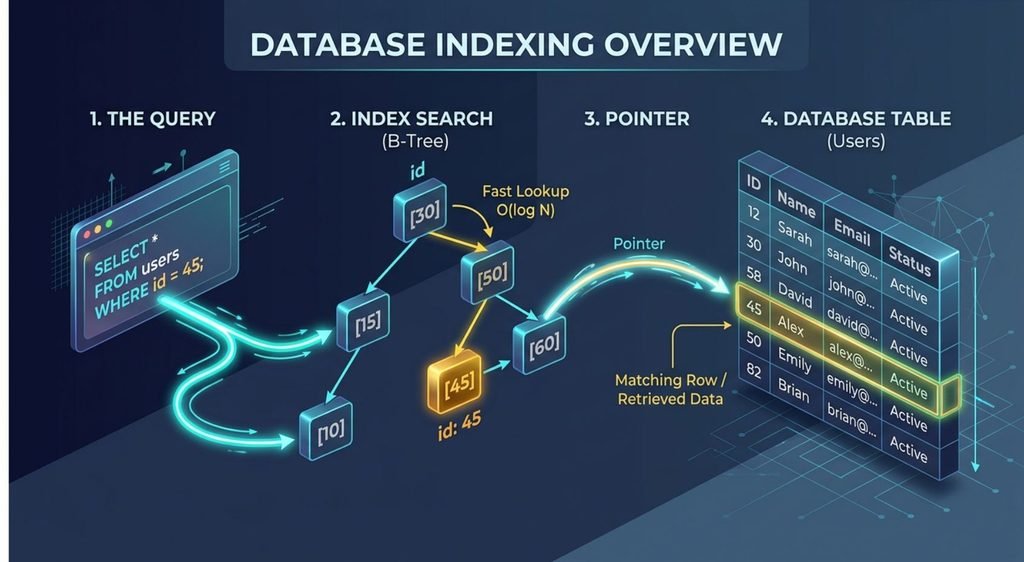
Indexing in DBMS is a technique that creates an additional data structure to make data retrieval faster.
An index usually contains a search key and information that helps the database locate record locations. Instead of checking every row, the database can search the index and then access the relevant data records.
For example, imagine an employees table with 10 million rows:
SELECT *
FROM employees
WHERE employee_id = 58291;
Without an appropriate index, the database may perform a full table scan or sequential scan, checking a large portion of the table.
With an index on employee_id, the database has another access path:
Query
  ↓
Index Search
  ↓
Find Matching Key
  ↓
Locate Record
  ↓
Return Data
This is the basic idea behind what is indexing data.
Why Is Indexing Important?
Why is indexing important? Because an appropriate index can reduce the amount of data the database needs to examine and the number of disk accesses required during a query.
Indexes are particularly useful for frequently executed queries involving WHERE, JOIN, and ORDER BY conditions.
However, an index is not free. It requires additional storage and must be maintained when data is inserted, updated, or deleted. Therefore, good indexing strategies balance faster reads against additional write and maintenance overhead.
For broader database architecture and performance concepts, see the database and scaling concepts covered in S4Stack’s System Design Cheat Sheet.
How Database Indexing Works Internally
To understand indexing in DBMS, consider a table whose data records are stored across multiple blocks in a data file.
Without an index, a database may need to examine one block after another:
Data File

Block 1 → Records
Block 2 → Records
Block 3 → Records
Block 4 → Records
...
An index creates an additional structure:
Index Entry
1001 → Block 1
1050 → Block 2
1100 → Block 3
1150 → Block 4
The database first searches the index for the required key value, determines where the relevant data is located, and then accesses that part of the table.
This is why efficient data structures are so important to database performance.
B-Tree Index and B+ Tree
One of the most common index algorithms is the B-tree family.
A B-tree keeps index entries organized in a balanced tree. Many database systems use B-tree variants because they support efficient equality and range queries while keeping the tree balanced.
               Root
              /      \
           Node       Node
          /   \       /   \
       Leaf  Leaf   Leaf  Leaf
A B-tree family index is particularly useful for equality and range queries, such as:
WHERE id = 100
WHERE id > 100
WHERE id BETWEEN 100 AND 500
The important idea is that the database does not need to scan every data record. It navigates through a structured index file to find the required location.
This is the core principle behind modern indexing algorithms.
For more specialized indexing concepts, including how different index structures behave at scale, see S4Stack’s guide to HNSW and IVF indexing.
Dense Index vs Sparse Index
A dense index maintains an index entry for every search key value or, in traditional DBMS terminology, an entry associated with every record.
Example:
1001 → Record 1
1002 → Record 2
1003 → Record 3
1004 → Record 4
A sparse index contains fewer entries and can point to blocks or selected key values:
1001 → Block 1
1004 → Block 2
1007 → Block 3
The database uses the appropriate entry to determine where the desired record should exist.
A dense structure can make lookup more direct but requires more space, while a sparse structure can reduce index size.
Types of Indexing in DBMS
There are several types of indexing, but they describe different characteristics of an index rather than one single classification.
Primary Index
A primary index is traditionally created when the data file is ordered according to a unique primary key or ordering key.
Because the records are stored in sorted order, the index can help the database quickly determine where the required record exists.
This is why primary indices are an important concept in traditional DBMS theory.
Secondary or Non-Clustered Index
A secondary index provides another access path to the same data.
A non-clustered index does not determine the overall physical ordering of the table’s records. Instead, the index contains references that allow the database to find the corresponding data.
For example:
CREATE INDEX idx_employee_email
ON employees(email);
Now email becomes an additional searchable path.
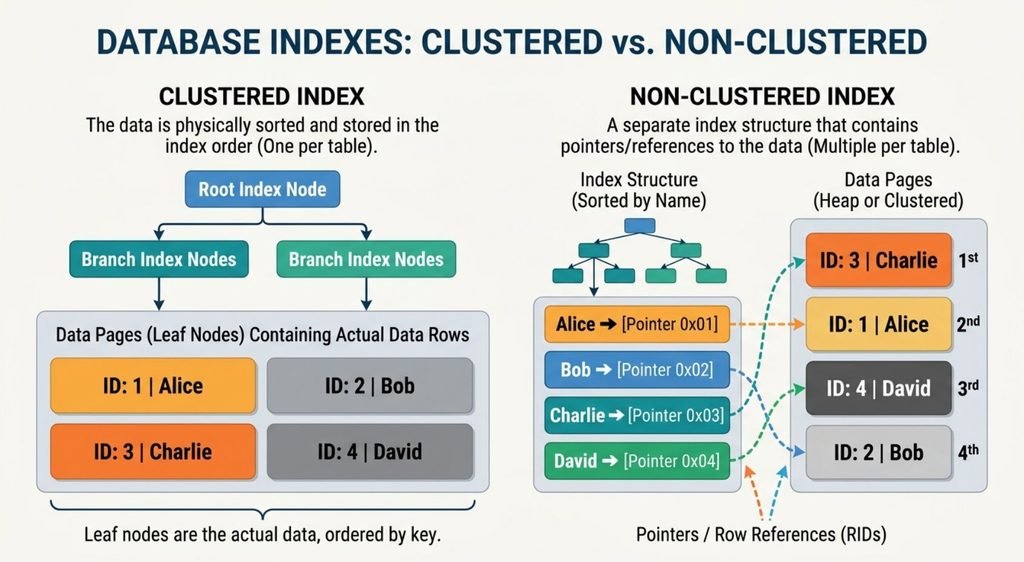
Clustered Index
A clustered index in database systems is an index structure where the table’s row data is organized or stored in association with the index key order. The exact implementation differs between database engines.
Because the data is associated with the index organization, clustered indexes can be especially useful for ordered access and range queries.
For example, InnoDB uses the primary key as its clustered index when a primary key exists. See the official MySQL InnoDB clustered and secondary indexes documentation.
Multilevel Indexing
As an index file becomes large, searching the index itself can require multiple accesses.
Multilevel indexing solves this problem by creating an index over another index:
Level 2 Index
      ↓
Level 1 Index
      ↓
Data Blocks
      ↓
Actual Data
This hierarchical approach reduces the amount of the index that must be examined.
Clustered vs Non-Clustered Index
The simplest distinction is where the actual table data sits relative to the index organization.
| Feature | Clustered Index | Non-Clustered Index |
|---|---|---|
| Data organization | Related to index order | Separate access structure |
| Actual data | Organized around indexed order | Reached through references |
| Useful for | Ordered and range access | Additional lookup paths |
| Number per table | DBMS-dependent | Multiple indexes are usually possible |
| Main benefit | Efficient access to ordered data | Flexible searches on different columns |
The implementation varies by database engine, so clustered indexes should always be understood in the context of the specific DBMS.
Single-Column and Composite Indexes
An index can be created on one column or multiple columns.
A composite index contains multiple columns:
CREATE INDEX idx_orders_customer_status
ON orders(customer_id, status);
Suppose your application frequently executes:
SELECT *
FROM orders
WHERE customer_id = 1001
AND status = 'pending';
The composite index can provide an efficient access path for this query.
The order of the indexed columns matters. For a B-tree composite index, the leading or leftmost columns are especially important when the database determines how much of the index it can efficiently search.
For example:
(customer_id, status)
is not simply equivalent to:
(status, customer_id)
The right indexing strategy depends on actual query patterns.
For more context on database scaling and how data distribution affects architecture, see What Is Sharding in Database?.
You can also consult the official PostgreSQL documentation on multicolumn indexes.
How Databases Use Indexes to Execute Queries
Creating an index does not guarantee that the database will use it.
The query planner or database optimizer evaluates possible execution paths and estimates their cost.
Depending on the query and data distribution, it may choose:
- Sequential scan
- Index scan
- Index-only scan
- Bitmap index scan
For example, suppose a table contains one million rows and a query returns 900,000 of them. Using an index may not be beneficial because the database still needs to access a huge percentage of the table.
This is why database optimizers do not simply ask, “Is this column indexed?”
They ask something closer to:
“Which execution plan is likely to retrieve this result set at the lowest estimated cost?”
EXPLAIN and EXPLAIN ANALYZE
When a query is slow, use the execution plan instead of guessing.
EXPLAIN ANALYZE
SELECT name
FROM employees
WHERE employee_id = 58291;
EXPLAIN shows the planned execution path, while EXPLAIN ANALYZE executes the query and provides actual execution information.
An execution plan can reveal whether PostgreSQL selected an index scan, sequential scan, bitmap index scan, or index-only scan.
For the complete syntax and behavior, see the official PostgreSQL EXPLAIN documentation.
Image Placeholder — Execution Plan Comparison: Show one query being executed through a Sequential Scan and another through an Index Scan, highlighting the difference in rows/pages examined.
How to Create and Use Database Indexes
The basic syntax for creating an index is:
CREATE INDEX idx_users_email
ON users(email);
For a unique value:
CREATE UNIQUE INDEX idx_users_username
ON users(username);
For multiple columns:
CREATE INDEX idx_orders_customer_status
ON orders(customer_id, status);
Some database systems also support partial indexes, expression indexes, and covering indexes.
For example, PostgreSQL can create a partial index:
CREATE INDEX idx_active_users
ON users(email)
WHERE active = true;
These advanced features are useful when your query workload has specific requirements, but their syntax and behavior vary by database engine.
For complete syntax and additional options, see the official PostgreSQL CREATE INDEX documentation.
When Should You Create an Index?
Good indexing strategies begin with actual query patterns.
Consider indexing columns that are frequently used in:
WHEREconditionsJOINconditionsORDER BY- Common lookup operations
For example:
SELECT *
FROM orders
WHERE customer_id = 1001;
If this query runs thousands of times and customer_id is highly selective, an index may significantly improve query performance.
However, don’t automatically index every column.
An index may provide little benefit when:
- A table is very small.
- A query returns a large percentage of the table.
- A column has very few distinct values.
- The column is rarely used for filtering or sorting.
- The index adds significant write overhead without providing useful reads.
Selectivity matters because an index is generally more useful when it can eliminate a large portion of the possible rows.
Database Indexing Best Practices
Effective database indexing is about creating useful access paths—not creating as many indexes as possible.
1. Index real query patterns. Look at the SQL your application actually executes.
2. Avoid unnecessary indexes. Every index consumes storage and requires maintenance.
3. Choose composite index order carefully. The order of indexed columns affects how effectively a composite B-tree index can narrow a search.
4. Use EXPLAIN ANALYZE. Check whether the query planner actually chooses your index.
5. Consider covering indexes. When an index contains all the columns needed by a query, some database systems can use an index-only scan and avoid fetching the corresponding table rows in cases where the required visibility information is available.
6. Consider selectivity. Highly selective columns are often better candidates for lookup indexes.
7. Remember write performance. INSERT, UPDATE, and DELETE operations may become more expensive because indexes also need to be maintained.
8. Choose the appropriate index structure. B-tree is a strong general-purpose choice, while Hash, GIN, GiST, SP-GiST, and BRIN are designed for different workloads.
9. Monitor index usage. Don’t assume an index is useful just because it exists.
10. Keep database statistics accurate. The optimizer relies on statistics to estimate result sizes and choose an appropriate execution plan.
For more detailed information about PostgreSQL index types, index-only scans, partial indexes, and other indexing features, see the official PostgreSQL Indexes documentation.
Final Takeaway
So, what is indexing in DBMS?
Indexing is a technique that adds an auxiliary data structure to help a database find and retrieve data records more efficiently.
Without an index:
Query
  ↓
Scan Table
  ↓
Check Rows
  ↓
Find Match
With an index:
Query
  ↓
Search Index
  ↓
Find Key
  ↓
Locate Record
  ↓
Retrieve Data
The concept starts with a simple idea, but effective indexing in DBMS requires understanding B-tree indexes, primary indices, dense index, sparse index, clustered index, non-clustered index, composite indexes, index scan, query planner, and execution plan.
The best approach is not to index everything. Instead, study the queries your application actually runs, identify useful indexed columns, create appropriate indexes, and use tools such as EXPLAIN ANALYZE to verify whether those indexes improve real query performance.
Database indexing also fits into the larger database architecture alongside techniques such as replication and sharding. For example, Real-Time Database Replication explains how replication supports availability and read scaling, while indexing focuses primarily on efficient data access within a database workload.
FAQs
What is indexing in a database?
Database indexing is a technique that creates an additional data structure to help a database find and retrieve data records faster without scanning the entire table.
What are the three main types of indexes?
The three commonly discussed types are primary indexes, secondary (non-clustered) indexes, and clustered indexes, although classifications vary by database system.
What are two types of indexing?
Two traditional types are dense indexing, which maintains entries for records or search keys, and sparse indexing, which maintains fewer entries and typically points to blocks or selected keys.
How do you do indexing in SQL?
You can create an index using CREATE INDEX, for example: CREATE INDEX idx_users_email ON users(email);
What are the disadvantages of indexing?
Indexes require additional storage and maintenance, which can increase the cost of INSERT, UPDATE, and DELETE operations.