What is System Design?
System Design is the process of planning how an entire software application should work before it is built.
Instead of asking, “How do I write this function?”, System Design asks much bigger questions:
- How will millions of users access the application?
- Where should data be stored?
- What happens if one server fails?
- How can requests be processed quickly?
- How can the application continue growing without slowing down?
- How should different services communicate securely?
These questions are impossible to answer by writing code alone.
They require thinking about the overall architecture of the software.
In other words, System Design is the blueprint of an application.
Just as architects create blueprints before constructing skyscrapers, software engineers design architectures before building applications that may eventually serve millions of users.
A good System Design ensures that software remains fast, secure, reliable, and maintainable even years after it is launched.
Imagine This…
It’s Friday evening.
Millions of people around the world are watching their favorite shows on Netflix.
Thousands of customers are checking out on Amazon.
Friends are sharing photos on Instagram.
Businesses are exchanging messages on WhatsApp.
Drivers are accepting rides on Uber.
Now imagine if all these users suddenly opened these applications at the exact same moment.
Would the servers crash?
Would the databases stop responding?
Would the applications become painfully slow?
For a poorly designed application, the answer is yes.
But for companies like Google, Amazon, Netflix, Meta, and Microsoft, this is simply another normal day.
Their applications continue serving millions—even billions—of requests every day with remarkable speed and reliability.
The secret isn’t just powerful hardware or expensive cloud servers.
It’s great System Design.
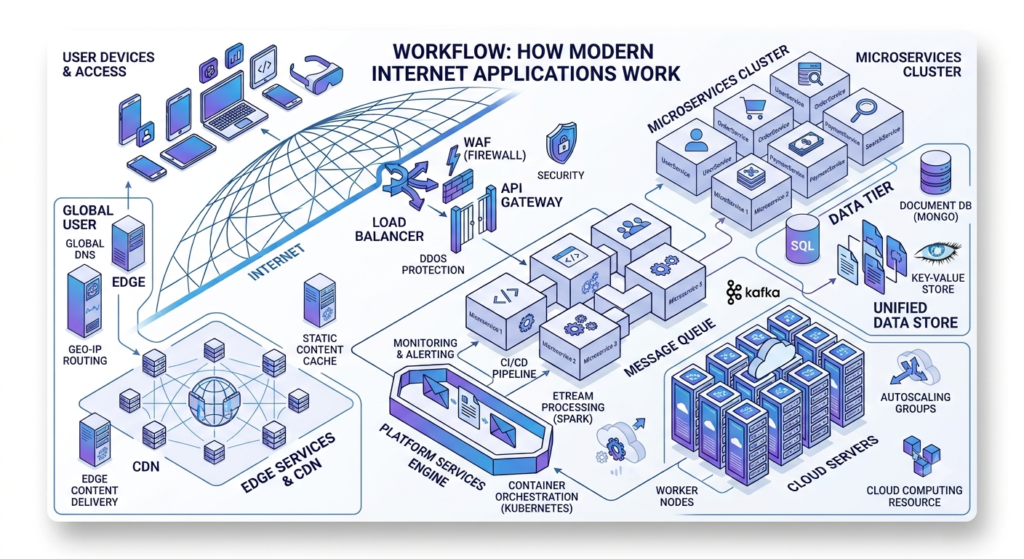
Behind every successful software application is an architecture carefully designed to distribute traffic, store data efficiently, recover from failures, and scale automatically as demand increases.
Without proper System Design, even the most beautifully written code will eventually fail when users start arriving in large numbers.
This is why experienced software engineers spend almost as much time designing systems as they do writing code.
Good architecture prevents problems before they happen.
Did You Know?
Netflix serves content to more than 300 million subscribers worldwide, while WhatsApp delivers billions of messages every day. These platforms remain reliable not because of a single powerful server, but because thousands of distributed systems work together behind the scenes.
System Design Isn’t Just for Big Tech
One of the biggest misconceptions is that System Design only matters for companies like Google or Amazon.
In reality, every application benefits from good architecture.
Whether you’re building:
- a personal blog,
- an online store,
- a hospital management system,
- a banking application,
- a ride-sharing platform,
- or a social media app,
you still need to think about scalability, security, databases, performance, and maintainability.
The only difference is scale.
A local business might serve hundreds of users each day, while a global platform may serve millions every minute—but both rely on the same design principles.
That’s why learning System Design early in your software engineering journey is one of the smartest investments you can make.
Why Is System Design Important?
Imagine you’ve built a new social media application.
For the first few weeks, everything works perfectly. A few hundred users sign up, upload photos, and chat with friends. Your single server easily handles the traffic, and response times are fast.
Then something unexpected happens.
A popular influencer shares your app with millions of followers.
Within a few hours, thousands of people are trying to create accounts, upload images, and send messages simultaneously.
Suddenly:
- Pages take forever to load.
- Login requests start failing.
- Images refuse to upload.
- The database becomes overloaded.
- Eventually, the entire application crashes.
Did the code suddenly become bad?
Not at all.
The real problem is that the application was never designed to handle growth.
This is exactly why System Design exists.
It helps engineers build software that continues performing reliably—not only today, but also when the application grows from 100 users to 100 million users.
System Design Is More Than Writing Code
Many beginners believe software engineering is simply about writing code.
While coding is essential, it’s only one piece of a much larger puzzle.
Think about YouTube.
When you click on a video, far more happens than simply fetching a file from a database.
Behind the scenes, YouTube performs dozens of operations within milliseconds.
It checks whether you’re logged in, identifies your location, retrieves video metadata, recommends related content, selects the nearest CDN server, records analytics, loads comments, and begins streaming the video—all before you even press Play.
Every one of these operations is handled by different systems working together.
This coordination is made possible through good System Design.
Instead of focusing on individual pieces of code, architects focus on how every service communicates, scales, and recovers from failures.
Why Every Modern Application Needs Good System Design
As software grows, new challenges appear.
A successful application must solve far more than business logic.
It needs to answer questions like:
- How can millions of users access the application simultaneously?
- How do we keep data secure?
- What happens if a server crashes?
- How can we reduce response times?
- How do we store billions of records efficiently?
- How can new features be added without affecting existing users?
Without proper architecture, every new feature makes the application slower, harder to maintain, and more expensive to operate.
Good System Design prevents these problems before they happen.
1. It Makes Applications Scalable
One of the primary goals of System Design is scalability.
Scalability means an application can continue handling increasing workloads without suffering significant performance degradation.
Imagine a small coffee shop.
With two employees, serving twenty customers each hour is easy.
Now imagine one thousand customers arriving every hour.
The same two employees cannot keep up.
The solution isn’t to ask them to work faster.
Instead, the coffee shop hires more staff, installs additional coffee machines, and opens more service counters.
Software systems scale in a similar way.
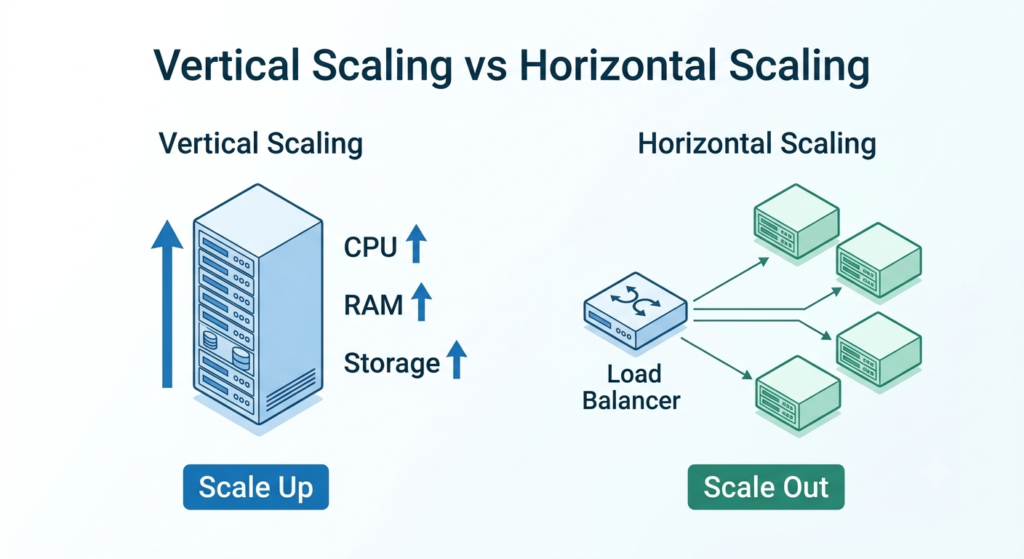
Instead of forcing one server to do everything, engineers distribute work across multiple servers.
As demand increases, more servers can be added to maintain performance.
This approach allows companies like Netflix, Amazon, and Google to continue growing without constantly rebuilding their entire infrastructure.
Vertical Scaling vs Horizontal Scaling
| Vertical Scaling | Horizontal Scaling |
|---|---|
| Adds more CPU and RAM to one server | Adds more servers |
| Easier to implement | Better for massive systems |
| Limited by hardware | Almost unlimited growth |
| Higher hardware cost | Better fault tolerance |
| Common in small applications | Used by Google, Netflix, Amazon |
Today, most cloud-native applications rely primarily on horizontal scaling because it offers greater flexibility and resilience.
2. It Improves Reliability
Imagine you’re shopping online during a holiday sale.
You’ve added products to your cart and are about to complete your payment.
Just before clicking Place Order, the website crashes.
You refresh the page, but nothing loads.
Most likely, you’ll abandon the purchase and buy from another website.
This is why reliability matters.
A reliable system continues functioning correctly even when unexpected failures occur.
Servers fail.
Hard drives stop working.
Networks become unavailable.
Cloud providers experience outages.
Instead of assuming failures will never happen, modern architectures are designed to expect them.
Multiple servers, replicated databases, automated backups, and failover mechanisms ensure users experience little or no disruption.
3. It Delivers Better Performance
Nobody enjoys waiting.
Research has consistently shown that users expect web pages and mobile applications to respond almost instantly.
Even small delays can negatively affect user engagement and conversions.
Performance optimization begins long before developers write optimized code.
A well-designed system uses:
- Caching
- Content Delivery Networks (CDNs)
- Optimized databases
- Load balancing
- Efficient APIs
Together, these technologies reduce unnecessary work and keep applications responsive under heavy traffic.
4. It Makes Software Easier to Maintain
Imagine building a house.
If every room shares the same electrical wiring, plumbing, and structural supports, even a minor renovation becomes risky.
Software behaves similarly.
Poorly organized applications become difficult to understand, debug, and extend.
A well-designed architecture separates responsibilities into independent components.
For example:
- Authentication Service
- Payment Service
- Notification Service
- User Service
- Product Service
Each service focuses on one responsibility.
This makes updates safer and significantly reduces maintenance costs.
5. It Saves Money
Many people assume solving performance problems simply means buying bigger servers.
Unfortunately, that’s one of the most expensive approaches.
Imagine paying for ten powerful cloud servers when a properly designed caching layer could reduce server load by 70%.
Good System Design minimizes unnecessary infrastructure costs by making smarter architectural decisions instead of relying solely on expensive hardware.
Large companies save millions of dollars each year through efficient system design.
6. It Opens Better Career Opportunities
System Design is one of the biggest differences between a junior developer and a senior software engineer.
Junior developers typically focus on implementing individual features.
Senior engineers think about the entire system.
They ask questions such as:
- Will this architecture still work next year?
- How will it perform with ten times more users?
- What happens if this database fails?
- Can another team easily build on top of this service?
These broader architectural decisions are what companies evaluate during senior engineering interviews.
That’s why organizations like Google, Amazon, Microsoft, Meta, Uber, and Stripe include System Design rounds in their hiring process.
They want engineers who understand not only how to write software, but also how to design software that lasts.
Key Benefits of Learning System Design
| Benefit | Why It Matters |
|---|---|
| Scalability | Supports millions of users without major redesign |
| Reliability | Keeps applications running during failures |
| Performance | Delivers fast response times under heavy traffic |
| Maintainability | Makes software easier to update and debug |
| Cost Efficiency | Reduces unnecessary cloud infrastructure expenses |
| Career Growth | Essential skill for senior software engineering roles |
Did You Know?
Some of the world’s largest technology companies process astonishing amounts of data every second:
- Google handles billions of searches every day.
- YouTube streams hundreds of millions of hours of video daily.
- Amazon processes massive shopping traffic during global sales events.
- WhatsApp delivers billions of messages across the world every day.
These platforms succeed because they are built on strong System Design principles rather than relying on a single powerful server.
How Modern Applications Work Behind the Scenes
Every day, we interact with dozens of applications without giving much thought to what happens after we tap a button.
When you log in to Facebook, search for a product on Amazon, watch a movie on Netflix, or send a message on WhatsApp, the response appears almost instantly. It feels simple from the user’s perspective—but behind the scenes, a surprisingly complex chain of events takes place in just a fraction of a second.
Understanding this journey is one of the first steps toward mastering System Design.
Let’s follow a single request and see what really happens.
A Real-World Example: Logging Into an Application
Imagine you’ve just opened your favorite shopping app and tapped the Login button.
From your perspective, it looks like nothing more than entering an email address and password.
However, your request travels through several components before you see the dashboard.
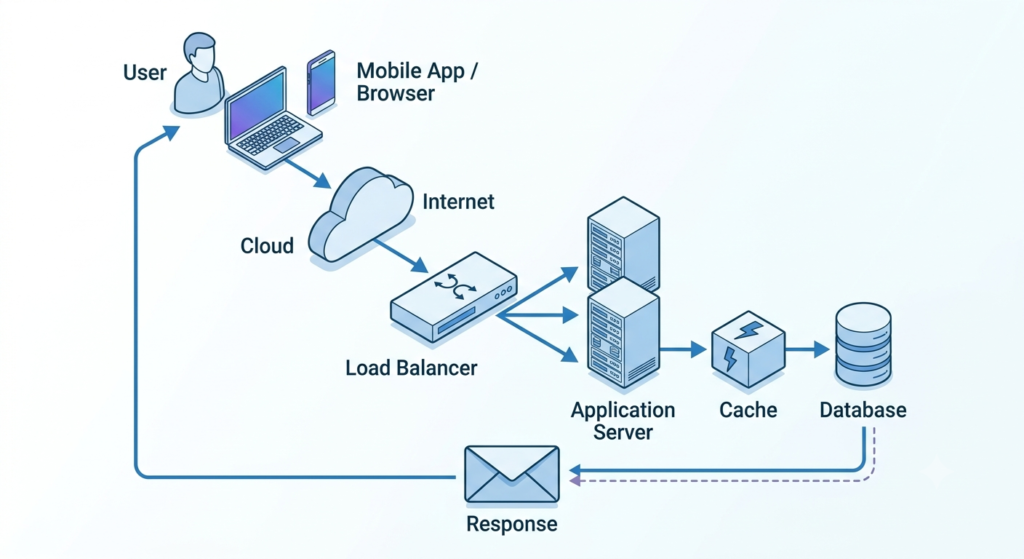
Step 1: The Client Sends a Request
The journey begins on the client.
A client is any application that communicates with a server.
It could be:
- A web browser like Chrome or Edge
- A mobile app on Android or iPhone
- A desktop application
- Another backend service
When you press Login, the client creates an HTTP request and sends it over the internet.
For example:
POST /login

Email: john@example.com
Password: ********
At this point, your application has done its job.
Now the server takes over.
Step 2: The Request Travels Across the Internet
Your request doesn’t magically appear on the server.
It travels across multiple networks, routers, Internet Service Providers (ISPs), and data centers before reaching the application’s infrastructure.
Although this sounds like a long journey, it usually takes only a few milliseconds.
Modern networking technologies and optimized routing make this possible.
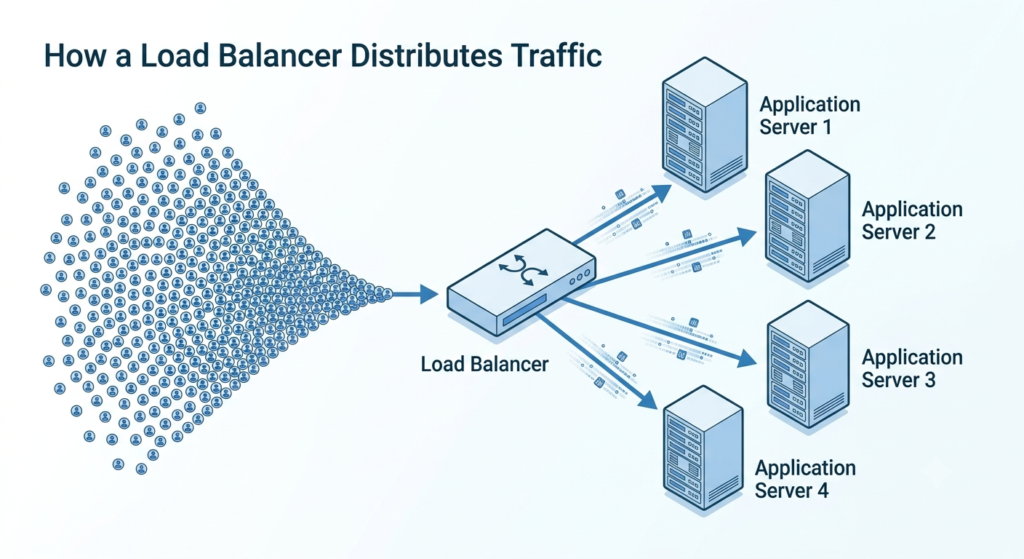
Step 3: The Load Balancer Receives the Request
Imagine a popular online store during a Black Friday sale.
Instead of receiving a few hundred visitors, millions of customers are trying to access the website simultaneously.
If every request were sent to a single server, that server would quickly become overloaded and eventually crash.
This is where a Load Balancer comes in.
A load balancer acts like a traffic controller.
Instead of allowing one server to handle all incoming requests, it distributes traffic across multiple servers.
For example:
100,000 Requests

↓

Load Balancer

↓

Server A

Server B

Server C

Server D
By spreading the workload evenly, no single server becomes overwhelmed.
This improves both performance and reliability.
Large companies such as Google, Amazon, and Netflix rely heavily on load balancers because they receive millions of requests every minute.
Step 4: The Application Server Processes the Request
Once the request reaches one of the servers, the application begins processing it.
This is where your business logic lives.
For a login request, the server might:
- Validate the email address
- Verify the password
- Check whether the account exists
- Generate a secure authentication token
- Record the login activity
- Prepare a response
If everything is correct, the user is authenticated.
If not, an error message is returned.
Application servers are responsible for executing the core functionality of your software.
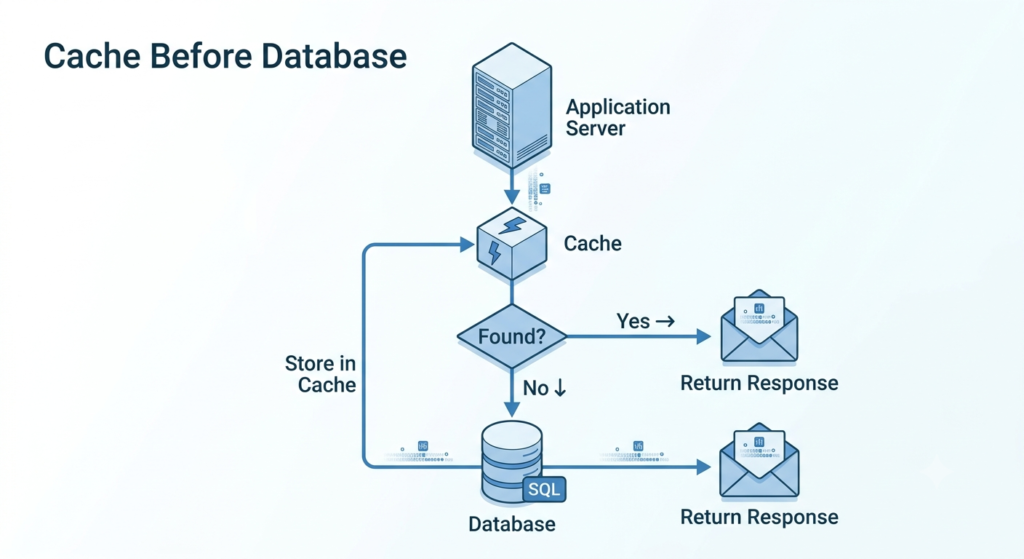
Step 5: The Server Checks the Cache First
Accessing a database is relatively slow compared to reading information from memory.
To improve speed, modern applications first check a cache.
A cache is a high-speed storage layer that keeps frequently accessed data in memory.
Think of it as keeping your most-used tools on your desk instead of walking to the storage room every time you need them.
For example, an e-commerce website may cache:
- Popular products
- User sessions
- Homepage content
- Trending searches
- Frequently viewed categories
If the required information already exists in the cache, the server can return it almost instantly.
If not, it requests the data from the database.
This simple technique dramatically reduces response times and decreases database load.
Step 6: The Database Stores the Real Data
If the requested information isn’t available in the cache, the application queries the database.
Databases are responsible for permanently storing application data.
Examples include:
- User accounts
- Orders
- Messages
- Payments
- Products
- Videos
- Comments
Unlike cache, databases prioritize durability and consistency.
Even if the application restarts, the data remains safe.
Popular databases include:
Relational Databases
- PostgreSQL
- MySQL
- Microsoft SQL Server
Best for:
- Banking
- Inventory
- Payment systems
- Business applications
NoSQL Databases
- MongoDB
- Cassandra
- DynamoDB
Best for:
- Social media
- Messaging platforms
- Large-scale web applications
- Real-time analytics
Step 7: The Response Travels Back to the User
Once the server finishes processing the request, it creates a response.
For example:
{
“status”: “Success”,
“message”: “Welcome back!”,
“token”: “JWT_TOKEN”
}
The response follows the same network path back to the client.
Your browser or mobile app receives the data and updates the interface.
From the user’s perspective, the entire process feels almost instantaneous.
In reality, dozens of systems have worked together within milliseconds.
The Complete Request Lifecycle
Here’s the entire journey summarized in one sim
User
↓
Browser / Mobile App
↓
Internet
↓
Load Balancer
↓
Application Server
↓
Cache
↓
Database
↓
Application Server
↓
Browser
↓
User
Every click you make online follows a similar pattern.
Whether you’re posting a tweet, uploading a photo, or booking a flight, these building blocks work together behind the scenes.
Why Understanding This Flow Matters
Many beginners jump straight into advanced topics like microservices, Kubernetes, or distributed databases.
However, those concepts only make sense after you understand how a basic request flows through a system.
Once you master this lifecycle, every advanced System Design concept becomes easier to understand because you’ll know where each technology fits and why it’s needed.
Instead of memorizing tools, you’ll understand the problems they solve.
Key Takeaways:
- Every application starts with a client sending a request.
- Requests travel through the internet before reaching the server.
- A load balancer distributes traffic across multiple servers.
- Application servers execute the business logic.
- A cache speeds up frequently requested data.
- Databases permanently store application information.
- The server returns a response to the client, completing the request lifecycle.
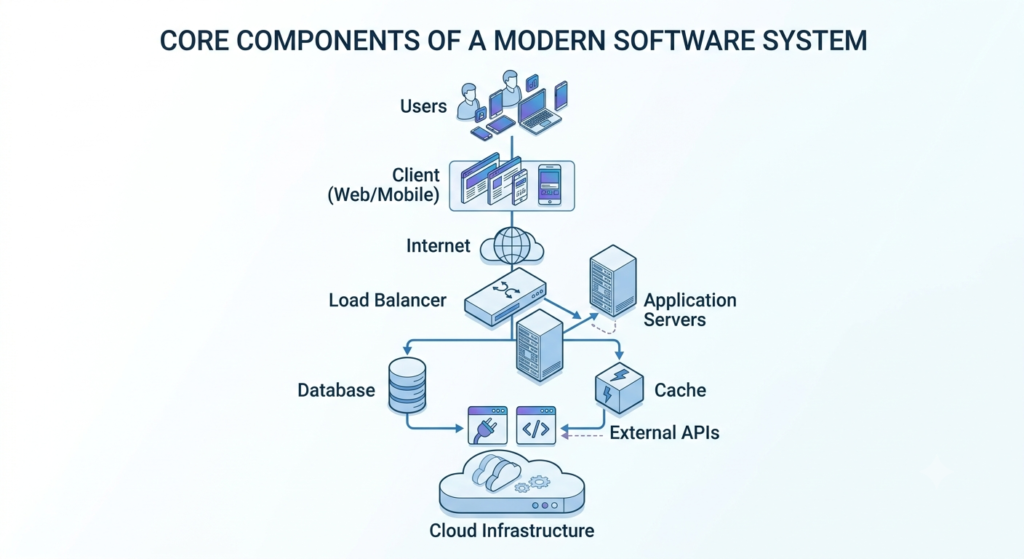
The Core Components of Every Modern Software System
Now that you’ve seen how a request travels from your device to the server and back, let’s identify the building blocks that make this entire process possible.
Regardless of whether you’re building a blogging platform, an e-commerce store, a banking application, or a social media network, almost every modern software system is built using the same core components.
Understanding these components will make the rest of this guide much easier to follow.
1. Client
The client is the application that users interact with directly.
It acts as the front door to your software and is responsible for collecting user input, displaying information, and communicating with the backend server.
A client can be:
- A web browser like Google Chrome or Microsoft Edge
- A mobile application for Android or iOS
- A desktop application
- Another backend service consuming an API
For example, when you search for a product on Amazon or send a message on WhatsApp, the client creates a request and sends it to the backend.
2. Server
The server is the brain of the application.
Its primary responsibility is to receive requests, process business logic, access data when needed, and return an appropriate response.
Depending on the application’s architecture, a server may handle tasks such as:
- Authenticating users
- Processing payments
- Uploading files
- Generating reports
- Sending notifications
- Managing user accounts
Large applications usually run multiple servers simultaneously to improve performance and reliability.
3. Database
A database stores the application’s permanent information.
Without a database, applications would forget everything every time they restarted.
Typical data stored in databases includes:
- User profiles
- Passwords
- Orders
- Messages
- Products
- Payments
- Comments
- Uploaded files
Choosing the right database depends on the application’s workload, data relationships, and consistency requirements—topics we’ll explore in detail later.
4. Cache
A cache is a temporary, high-speed storage layer used to keep frequently accessed information in memory.
Instead of repeatedly querying the database for the same information, the application can retrieve it directly from the cache, significantly reducing response times.
Common examples of cached data include:
- Logged-in user sessions
- Trending products
- Popular articles
- Homepage content
- Frequently viewed videos
By reducing unnecessary database queries, caching improves both speed and scalability.
5. Load Balancer
A load balancer distributes incoming traffic across multiple application servers.
Without one, all requests would reach a single server, increasing the risk of slowdowns or outages during traffic spikes.
By spreading requests evenly, load balancers improve:
- Performance
- Reliability
- Fault tolerance
- Scalability
This is why they are a standard component in nearly every large-scale cloud application.
6. APIs
Applications rarely work in isolation.
They constantly exchange information with other services through Application Programming Interfaces (APIs).
For example:
- A payment gateway processes online transactions.
- A weather app retrieves forecasts from a weather service.
- Google Maps provides location and navigation data.
- An email service sends verification emails.
APIs allow different systems to communicate securely without exposing their internal implementation.
7. Cloud Infrastructure
Most modern applications are hosted on cloud platforms rather than physical servers inside an office.
Cloud providers offer scalable computing resources, managed databases, storage services, and networking tools that make it easier to build reliable applications.
Some of the most widely used cloud platforms include:
- Amazon Web Services (AWS)
- Google Cloud Platform (GCP)
- Microsoft Azure
Cloud infrastructure enables applications to grow as demand increases while reducing the operational burden of managing physical hardware.
Functional vs. Non-Functional Requirements
Before designing any software system, experienced software engineers ask one simple question:
“What exactly are we building, and how well should it perform?”
It might sound obvious, but many beginners jump straight into choosing databases, microservices, or cloud platforms without first understanding the application’s requirements.
This often leads to poor architectural decisions.
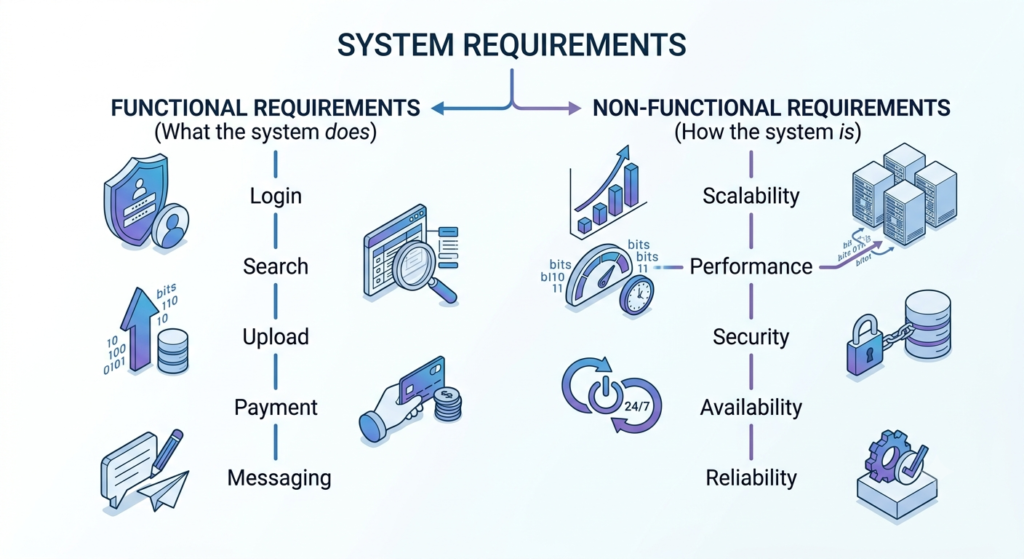
In System Design, every application starts with two types of requirements:
- Functional Requirements
- Non-Functional Requirements
Think of them as the foundation of a building. Without a clear foundation, even the strongest architecture can become unstable.
What Are Functional Requirements?
Functional requirements describe what a system should do.
In simple words, they define the features and capabilities that users expect from an application.
For example, imagine you’re designing an online shopping platform like Amazon.
Some functional requirements might include:
- Users should be able to create an account.
- Users should be able to log in securely.
- Customers should be able to search for products.
- Users should be able to add items to their cart.
- Customers should be able to place orders.
- Users should receive order confirmation emails.
- Admins should be able to manage products and inventory.
These requirements describe the functionality of the system—not how fast or scalable it is.
Simply put, functional requirements answer the question: “What should the system do?”
Examples of Functional Requirements
| Application | Functional Requirements |
|---|---|
| Send messages, make voice calls, share images, create groups | |
| YouTube | Upload videos, watch videos, subscribe to channels, comment on videos |
| Uber | Book rides, track drivers, calculate fares, process payments |
| Netflix | Stream movies, search content, create watchlists, recommend shows |
What Are Non-Functional Requirements?
While functional requirements describe what a system does, non-functional requirements describe how well it should do it.
These requirements focus on the quality and performance of the application rather than its features.
Some common non-functional requirements include:
- Fast response time
- High availability
- Scalability
- Security
- Reliability
- Maintainability
- Fault tolerance
- Low latency
For example, imagine you’re designing WhatsApp.
Sending messages is a functional requirement.
Delivering those messages within a fraction of a second—even when millions of users are online—is a non-functional requirement.
Similarly, allowing customers to place an order on Amazon is a functional requirement, while ensuring the platform remains available during Black Friday sales is a non-functional requirement.
Common Non-Functional Requirements
| Requirement | Why It Matters |
|---|---|
| Scalability | Supports millions of users without slowing down |
| Availability | Keeps the application online with minimal downtime |
| Reliability | Ensures the system performs consistently |
| Security | Protects user data from unauthorized access |
| Performance | Delivers fast response times |
| Maintainability | Makes future updates easier |
| Fault Tolerance | Continues working even when components fail |
Functional vs. Non-Functional Requirements
Understanding the difference between these two requirement types is essential because they influence every architectural decision you’ll make.
| Functional Requirements | Non-Functional Requirements |
|---|---|
| Define what the system does | Define how well the system performs |
| Focus on features | Focus on quality attributes |
| Visible to users | Often invisible until something goes wrong |
| Example: User login | Example: Login should complete in under 2 seconds |
| Example: Upload a file | Example: Support 1 million uploads per day |
| Example: Send notifications | Example: Deliver notifications with 99.99% availability |
Why Are Requirements Important in System Design?
Requirements act as the blueprint for every architectural decision.
For example:
Imagine you’re asked to design a video streaming platform.
Without understanding the requirements, you might choose technologies that are either too expensive or unable to handle future growth.
However, if you know the platform must:
- Support 20 million daily active users
- Stream 4K videos worldwide
- Deliver videos with minimal buffering
- Remain available 24/7
- Handle traffic spikes during live events
you’ll naturally consider solutions like:
- Content Delivery Networks (CDNs)
- Distributed storage
- Load balancers
- Caching
- Auto-scaling infrastructure
- Global server deployments
This demonstrates why gathering requirements is always the first step in System Design.
Best Practice
One of the biggest mistakes beginners make is discussing databases, caches, or microservices before defining the system’s requirements.
Professional software architects always begin by asking:
- What problem are we solving?
- Who are the users?
- How many users are expected?
- What features are required?
- How much traffic should the system handle?
- What level of reliability and security is needed?
Only after answering these questions do they start designing the architecture.
Key Takeaways
- Functional requirements define what a system should do.
- Non-functional requirements define how well the system should perform.
- Every successful System Design begins with gathering and understanding requirements.
- Requirements influence every architectural decision, from choosing a database to designing for scalability and reliability.
Final Thoughts
Every successful software system begins with a clear understanding of its requirements. Before choosing databases, designing APIs, or discussing cloud infrastructure, software architects first identify what the system should do and how well it should perform.
Functional requirements define the features users expect, while non-functional requirements establish the standards for performance, scalability, reliability, and security. Together, they form the foundation of every architectural decision.
Skipping this step often leads to poor design choices, expensive redesigns, and systems that struggle as they grow. By taking the time to gather and analyze requirements first, engineers can build applications that are easier to maintain, more resilient under heavy traffic, and better prepared for future growth.
Now that you understand how to identify and categorize system requirements, it’s time to explore the principles that make large-scale applications possible. In the next section, we’ll dive into Scalability, Availability, Reliability, Latency, Throughput, and the CAP Theorem—the core concepts that shape modern System Design.
External References
The following resources provide additional insights into software architecture and System Design fundamentals:
- Google Cloud Architecture Framework
https://cloud.google.com/architecture/framework - AWS Architecture Center
https://aws.amazon.com/architecture/ - Microsoft Azure Architecture Center
https://learn.microsoft.com/azure/architecture/ - Martin Fowler – Software Architecture
https://martinfowler.com/architecture/ - IBM – Functional and Non-Functional Requirements
https://www.ibm.com/topics/functional-requirements - Atlassian – Software Requirements
https://www.atlassian.com/agile/project-management/requirements
1. What are functional requirements in System Design?
Functional requirements define what a software system should do. They describe the features and capabilities users expect, such as user registration, login, searching for products, placing orders, sending messages, or uploading files. In simple terms, functional requirements explain the system’s functionality.
2. What are non-functional requirements in System Design?
Non-functional requirements define how well a system should perform rather than what it does. They focus on quality attributes such as scalability, performance, security, reliability, availability, maintainability, and fault tolerance. These requirements ensure the system delivers a smooth and dependable user experience.
3. What is the difference between functional and non-functional requirements?
Functional requirements describe the features of an application, while non-functional requirements describe the quality of those features. For example, allowing users to log in is a functional requirement, whereas ensuring the login process completes within two seconds is a non-functional requirement.
4. Why are requirements important in System Design?
Requirements provide the foundation for every architectural decision. Before selecting databases, servers, or cloud services, software architects first identify what the application must do and how it should perform. Well-defined requirements help prevent unnecessary complexity and reduce future development costs.
5. Can a software system work without non-functional requirements?
Technically, yes—but it is unlikely to perform well in real-world scenarios. Without non-functional requirements, an application may become slow, difficult to scale, insecure, or unreliable as the number of users grows.
6. Which comes first in System Design: requirements or architecture?
Requirements always come first. Professional software architects gather functional and non-functional requirements before creating architecture diagrams or choosing technologies. Understanding the problem is the first step toward designing the right solution.
7. Are scalability and performance functional requirements?
No. Scalability and performance are non-functional requirements because they describe how efficiently the system should operate under different workloads, rather than defining a specific feature.
8. What are some real-world examples of functional and non-functional requirements?
For an e-commerce website:
Functional Requirements:
- User registration and login
- Product search
- Shopping cart
- Secure checkout
- Order tracking
Non-Functional Requirements:
- Support one million daily users
- Page load time under two seconds
- 99.99% system availability
- Secure payment processing
- Automatic scaling during sales events
9. What are the best platforms to learn System Design?
There are many excellent resources available for learning System Design, whether you’re preparing for technical interviews or building large-scale applications. Here are ten of the most trusted platforms:
| Platform | Best For |
|---|---|
| System Design Handbook | Comprehensive System Design guides, interview frameworks, and real-world case studies. |
| Educative.io (Grokking the System Design Interview) | Interactive, interview-focused learning with step-by-step explanations. |
| AlgoMaster.io | Beginner-friendly System Design roadmap, visual explanations, and practical interview preparation. |
| ByteByteGo | High-quality articles, newsletters, diagrams, and deep dives into distributed systems. |
| Design Gurus | Popular System Design interview courses, mock interviews, and coding preparation. |
| GeeksforGeeks | Free tutorials covering System Design fundamentals, interview questions, and architecture concepts. |
| High Scalability | Real-world architecture case studies from companies like Netflix, Facebook, and Uber. |
| Martin Fowler | Expert articles on software architecture, design patterns, microservices, and enterprise applications. |
| Google Cloud Architecture Center | Official best practices for designing scalable and reliable cloud-native applications. |
| AWS Architecture Center | Reference architectures, design patterns, and cloud solutions for building production-grade systems. |
If you’re just getting started, begin with AlgoMaster.io or GeeksforGeeks to build your fundamentals. Once you’re comfortable with the basics, move on to Educative.io, ByteByteGo, and Design Gurus for interview-focused preparation. Finally, study real-world architectures through System Design Handbook, Martin Fowler, Google Cloud, and AWS to deepen your understanding of scalable software systems.